
Set up the BTCPay Boltz plugin
Receive Lightning payments without Lightning Node directly to your own hardware wallet (BitBox example)
Many BTCPay server operators want to offer their customers not only traditional Bitcoin onchain payments, but also Lightning payments. In practice, this often fails due to the additional complexity: if you want to operate Lightning with your own node, you have to take care of channels, liquidity, rebalancing, backups and ongoing operations. This is where the BTCPay Boltz plug in becomes interesting. The plugin makes it possible to accept Lightning payments in a non-custodial setup without having to operate a Lightning node yourself. According to the official Boltz documentation, the plugin supports two operating modes: rebalance mode for existing Lightning nodes and a nodeless mode for merchants without their own node.
This is particularly exciting for merchants if all revenue is to end up on their own hardware wallet. In this article, I will show you step by step how to set up the Boltz BTCPay plugin so that your BTCPay server accepts both on-chain payments and lightning payments and the Bitcoin then ends up on the same hardware wallet. As an example, I use a BitBox wallet and the corresponding zpub key. BTCPay explicitly supports watch-only wallets, so the server can generate addresses and monitor payments without storing the private keys.
Who is this setup intended for?
This guide is aimed at anyone who already operates their own BTCPay server or is in the process of setting one up and does not want to operate their own Lightning Node. Typical use cases are merchants, freelancers, online stores or associations that want to accept Bitcoin as easily as possible, but still value self-custody and their own hardware wallet. BTCPay describes itself as a self-hosted and non-custodial payment gateway where payments go directly to your own wallet.
The setup is particularly interesting if you want the following:
Onchain payments should go directly to your Bitcoin wallet. Lightning payments should also be accepted. And in the end, both payment types should converge in the same wallet, for example on a BitBox. This is possible with the BTCPay Boltz plugin, because BTCPay can work with a watch-only wallet for the Bitcoin side, while the Boltz plugin processes the Lightning payment via swap.
What is the BTCPay Boltz plugin?
The Boltz BTCPay plug in is a plugin for BTCPay Server that allows merchants to accept Lightning payments non-custodially. According to the official documentation, the plugin can either automatically manage the liquidity of an existing Lightning node or accept Lightning payments without a separate node. In the second case, the plugin works with Lightning-to-Liquid swaps.
The technical logic is important here: in nodeless mode, a Lightning payment is not received directly on Bitcoin Mainchain. Instead, BTCPay creates a swap for the same amount via Boltz. After a successful Lightning payment, the amount is paid out to a Liquid Wallet minus fees. Boltz himself explains that Liquid is the only option in this mode because the network fees there are reliably low and even smaller Lightning payments remain economical.
How does the setup work technically?
A quick look at the payment flow will help you to explain or document the setup properly later on.
Onchain payment
With a normal Bitcoin onchain payment, everything works in the classic way:
BTCPay generates a new receiving address from the stored zpub/xpub. The customer pays directly to this address. The Bitcoin ends up in the wallet that belongs to this zpub. Watch-only wallets in BTCPay can be used for precisely this purpose: Derive addresses, monitor payments, but not issue coins independently.
Lightning payment
The process is different for a Lightning payment in Boltz Nodeless Mode:
The customer pays via Lightning. Boltz executes a Lightning → Liquid Swap. The result initially ends up in a Liquid Wallet. The balance can then be automatically converted back into Bitcoin Mainchain via chain swap. The Bitcoin wallet already configured in the store then serves as the destination. BTCPay describes precisely this logic in its Lightning documentation for swapping services such as Boltz.
The practical effect is crucial:
The merchant does not need its own Lightning Node, but can still accept Lightning payments. In the end, the same Bitcoin wallet target can be used for on-chain payments and for the BTC swapped back from Lightning.
What you need for the setup
Before you start, you should have these things ready:
- a running BTCPay server
- Access to server settings
- Access to Manage Plugins
- a BitBox wallet or another hardware wallet
- the zpub or xpub of the wallet that is to serve as the Bitcoin target wallet
- optional Sparrow Wallet, if you want to conveniently read or check the zpub
BTCPay documents various ways to set up wallets, including watch-only wallets based on extended public keys. For hardware wallets, BTCPay recommends setups in which the private keys remain on the device.
Step 1: Set up the Bitcoin wallet in the BTCPay server
The first step is to set up your normal Bitcoin wallet in the store. This wallet will later be used twice:
firstly for direct on-chain payments and secondly as a target wallet for the automatically re-swapped Lightning earnings.
Open the Wallets section in your store and set up your Bitcoin wallet there. If you are working with a BitBox, the cleanest way is a watch-only wallet based on zpub/xpub. BTCPay explicitly describes watch-only wallets as wallets where no private keys are stored on the server.
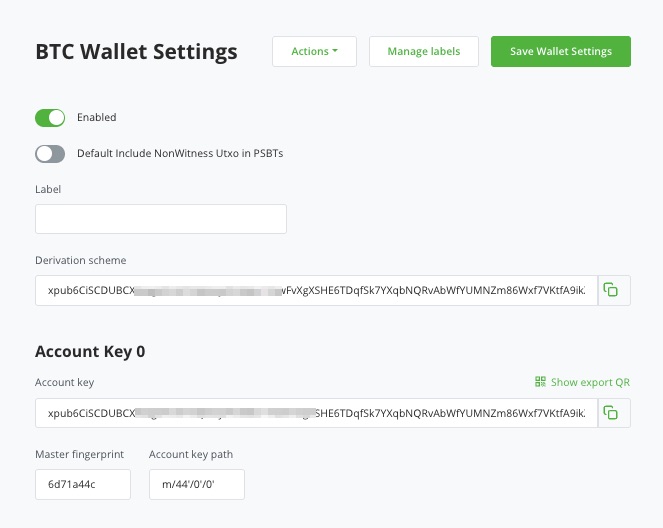
In practice, this means:
You take the zpub of your BitBox wallet and store it in BTCPay. From this moment on, BTCPay can derive new Bitcoin receiving addresses. The coins still belong to your BitBox wallet. BTCPay cannot issue them as long as only the public key is stored.
Important for this setup:
You do not need a second zpub for Lightning. The same zpub can also be used later for the Bitcoin target wallet of the Boltz Chain swaps. As long as BTCPay manages this wallet, the system can use addresses from the same wallet pool for on-chain payments and for the Bitcoin coming back from Lightning. This corresponds to the normal behavior of an HD/watch-only wallet in BTCPay.
Step 2: Install the BTCPay Boltz plugin
Next, install the plugin at server level.
To do this, go to Server Settings and then to Manage Plugins. There you install the Boltz plugin. After installation, a separate area for Boltz will appear in the navigation. Boltz explicitly documents this installation path for self-hosted BTCPay servers.
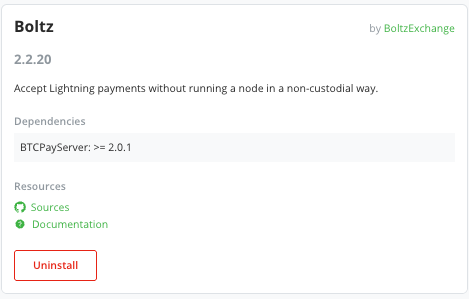
If you are running a shared BTCPay server or have multiple users on the server, you should also note that administrators can or must manually enable the plugin for tenants. The Boltz documentation calls the option Admin → Advanced → Allow Plugin for Tenants.
Step 3: Select the right mode
After installation, start the configuration in the Boltz area. There are two operating modes to choose from:
- Rebalance existing Lightning node
- Accept Lightning payments without running a node
The second option is the right one for this tutorial:
Accept Lightning payments without running a node.
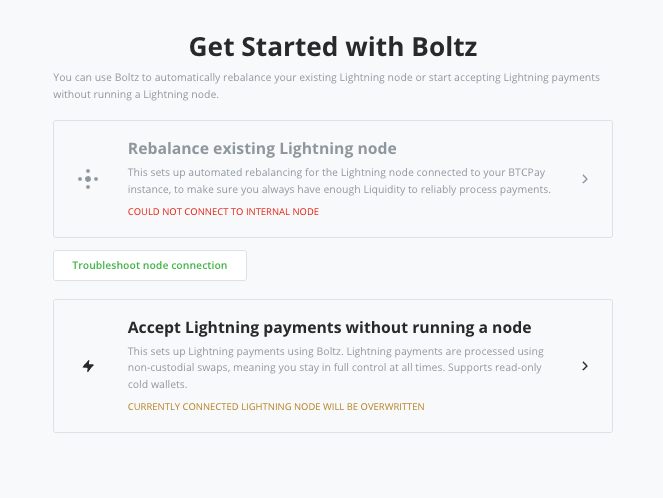
This is the so-called Nodeless Mode. It is intended precisely for operators who want to offer Lightning but do not operate their own Lightning Node. According to Boltz, the plugin is one of the solutions that allows merchants to accept Lightning payments non-custodially without having to operate a Lightning Node themselves.
Step 4: Check fees and swap model
In the next step, the plugin shows you an overview of fees, network fees and minimum and maximum amounts. At the same time, it explains that the nodeless mode works via Lightning → Liquid Swaps. This is exactly the core of the setup: Lightning does not become on-chain Bitcoin directly, but first becomes L-BTC.
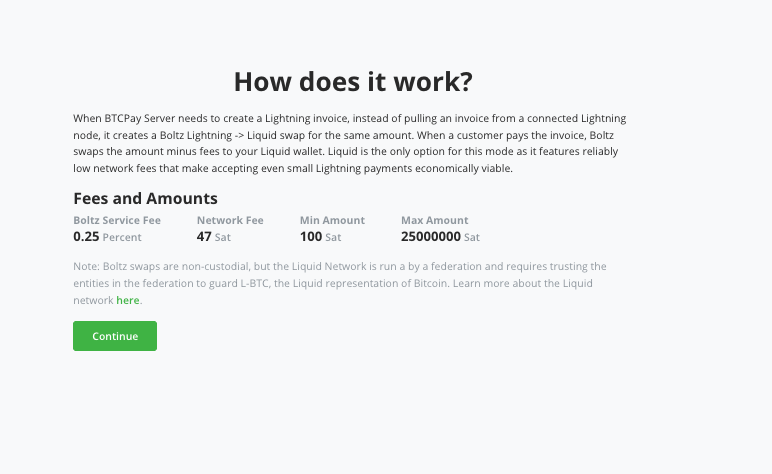
The key information for merchants is:
They do not receive lightning payments on a lightning node, but via a swap process. The advantage is the lower technical complexity. The disadvantage is that Liquid is used as an intermediate layer and additional swap fees may be incurred. BTCPay explicitly mentions swapping services such as Boltz as an option for automatically converting Lightning into on-chain Bitcoin or L-BTC.
Step 5: Create the internal Liquid Wallet
The plugin will now ask you for a wallet for the L-BTC inputs. For this setup, select :
Create a new wallet
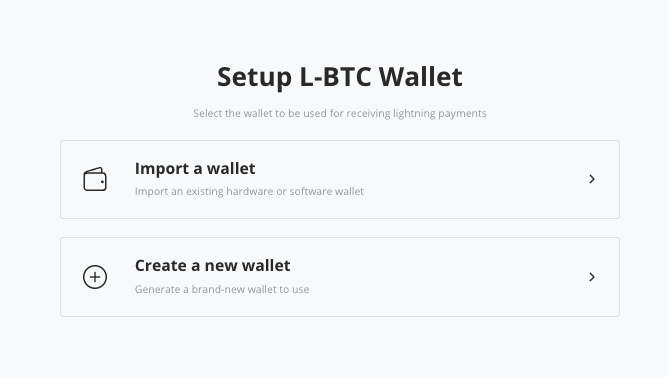
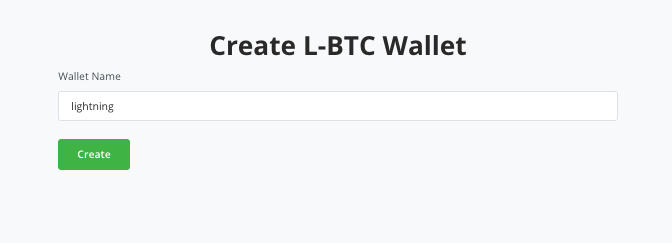
BTCPay then creates a new internal Liquid Wallet, which serves as the destination for the Lightning-to-Liquid swaps. Boltz describes exactly this step in his documentation: Merchants can create a new wallet or import an existing Liquid Wallet. The internal BTCPay Liquid Wallet is sufficient as an intermediate stage.
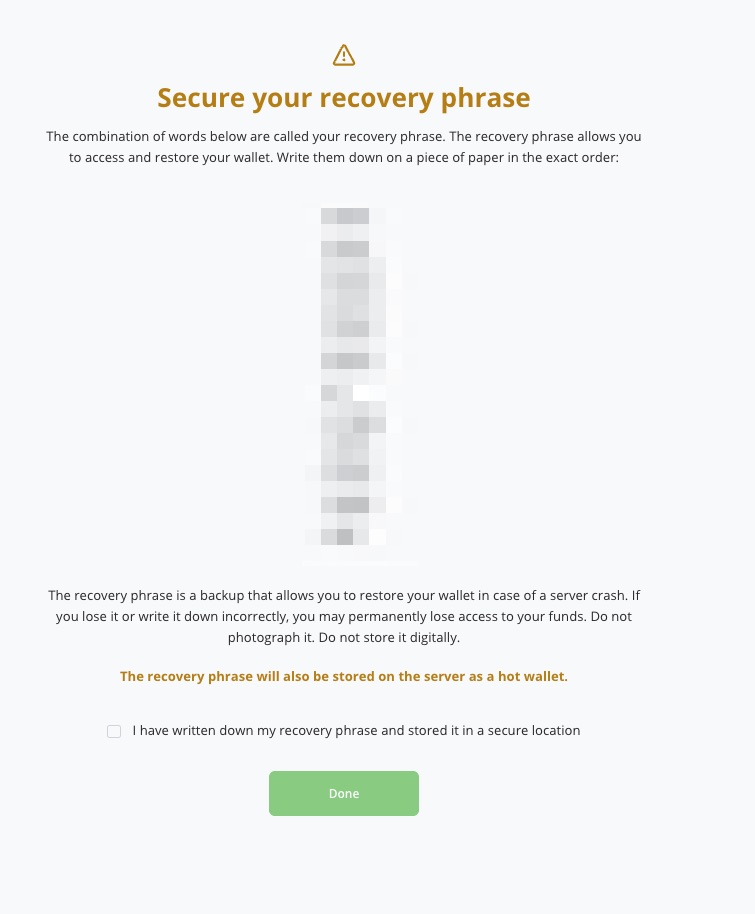
BTCPay will then show you a recovery phrase. You should make a secure note of this. At the same time, BTCPay points out that this wallet is stored as a hot wallet on the server. This is important when considering security: the internal liquid wallet is a practical intermediate station for the swaps, but it is not the same as a cold wallet.
You do not need an external Liquid Wallet if you only want to use the standard setup with the Boltz plugin. The internal BTCPay Liquid Wallet is sufficient as an intermediate stage.
Step 6: Set up chain swaps
In the next step, you configure the automatic reconversion from L-BTC to Bitcoin Mainchain. In the plugin, this section is called Set Up Chain Swaps.
Here you typically define two values:
- Max Balance
- Reserve Balance
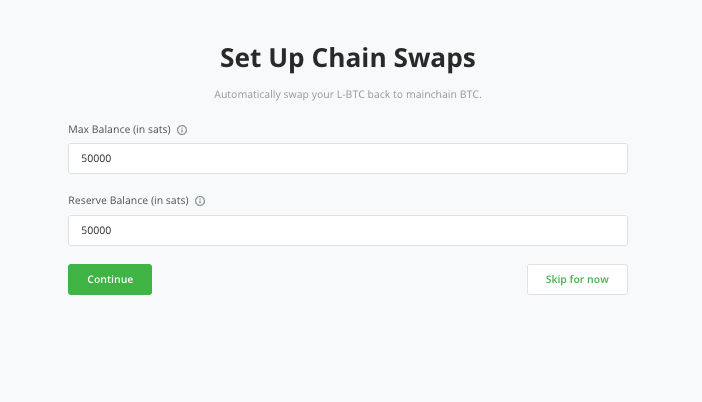
The logic behind this is simple:
The internal Liquid Wallet is allowed to hold credit up to a certain threshold value. If this value is exceeded, the plugin starts a chain swap back to the Bitcoin mainchain. A partial amount can remain in Liquid as a reserve. Boltz explicitly describes this function as an optional step to automatically convert L-BTC back into regular Bitcoin.
For traders who want to have as much as possible directly on their hardware wallet, a rather low max balance usually makes sense. This means that only a small amount of Liquid credit remains on the server and the majority is automatically converted back into normal BTC. This significantly improves the practicality of the setup, even if additional fees may be incurred.
Step 7: Select the same BitBox wallet as the BTC target wallet
Now comes the crucial part for your desired setup.
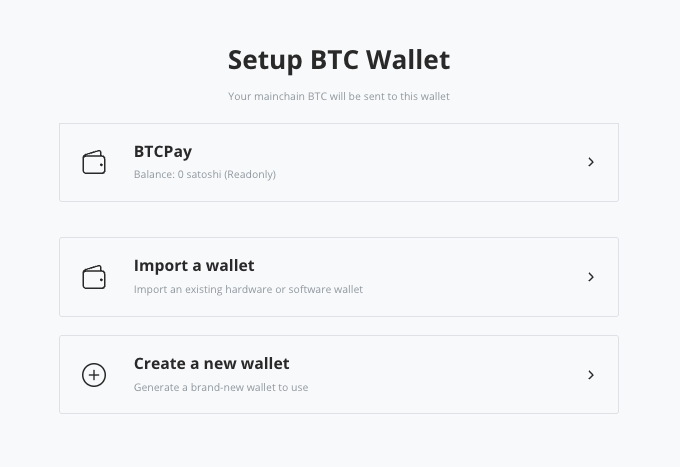
The plugin asks where the on-chain Bitcoin from the chain swaps should be sent. Here you select the Bitcoin wallet already set up in the store, i.e. BTCPay. The Bitcoin address created in step 1 is then used.
In our example, the stored xpub or zpub key.
This is exactly what makes the setup elegant:
Both direct on-chain payments and the Lightning income swapped back via Boltz end up in the same wallet structure. The merchant therefore does not need two different Bitcoin wallets, but only a single watch-only Bitcoin wallet in the store.
This is also the answer to the frequent practical question:
Is a single zpub of the BitBox sufficient?
Yes, a single zpub/xpub of the BitBox wallet is sufficient for this setup if it is already stored in the store for on-chain payments and the same wallet is selected as the destination of the chain swaps in the Boltz plugin. BTCPay can manage receiving addresses based on this public key without the merchant having to disclose their private keys.
Alternatively, you can also use another on-chain Bitcoin wallet to which the Lightning transactions are to be credited. You can either create a new wallet (create a new Wallet) or import another xpub or zpub key via Import a Wallet.
Step 8: Finalize the setup
Now a message appears that refers to rebalancing. The other function of the Boltz plugin, which we do not use. Simply click on Continue.
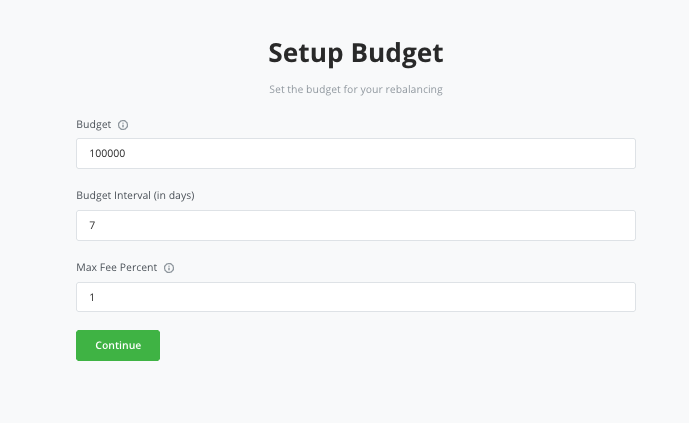
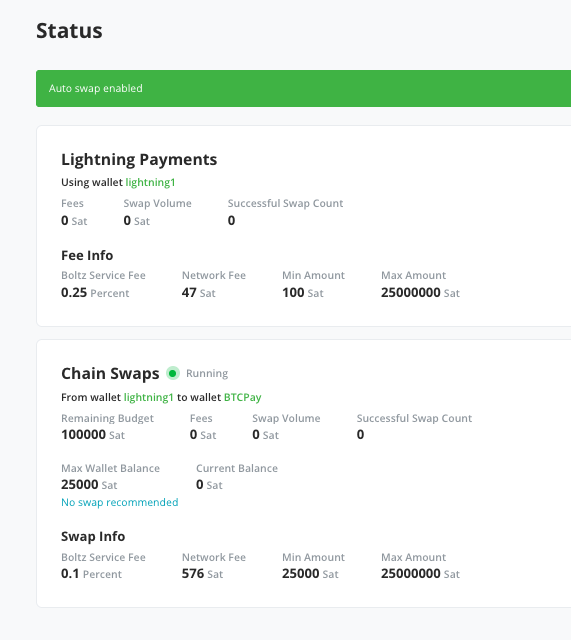
Here we enable the autoswap. The automatic change of the incoming Lightning payment to Liquid and from Liquid to Onchain Bitcoin, which is then credited directly to our Onchain Wallet.
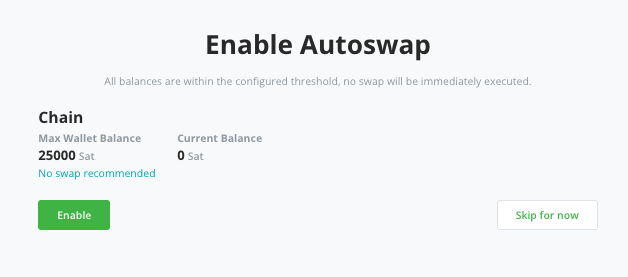
We then receive an overview of the settings we have made.
- Onchain payments go directly to the store’s Bitcoin wallet
- Lightning payments run via the Boltz plugin
- L-BTC ends up in the internal Liquid Wallet for a short time
- Chain swaps send the Bitcoin back to the hardware wallet (e.g. Bitbox)
Step 9: Make a test payment
Before you use the setup productively, you should definitely make a small test payment.
To do this, create an invoice in your store and check whether Bitcoin and Lightning are offered as payment methods. Pay the invoice with a Lightning wallet as a test. Then check in the Boltz → Swaps section whether the swap was created and processed correctly. Boltz itself recommends making a small test purchase after the setup.
Only once you have seen the complete process will you really understand how the setup behaves in everyday life. The first test in particular shows that Lightning payments do not end up on a Lightning node, but on the Liquid intermediate stage and only then go back into on-chain Bitcoin.
What data is required?
When you set up the setup, you only need very little information in the simplest case:
- the zpub/xpub of the hardware wallet, for example the BitBox
- Access to the BTCPay server
- consent for the plugin to create an internal Liquid Wallet as a hot wallet
- the desired setting for Max Balance and Reserve Balance
What you don’t need:
- no seed of the BitBox
- no private keys of the BitBox
- No own Lightning Node of the retailer
This is precisely what makes the setup attractive for many merchants: the cold storage wallet remains with the merchant, while BTCPay only works with public wallet data and Boltz enables Lightning reception via swap.
The advantages of this setup
The biggest advantage is the simple combination of self-custody and Lightning support. Merchants don’t have to learn the ins and outs of Lightning node operations, but can still accept Lightning payments. BTCPay lists Boltz as exactly one of the swapping service options for this purpose.
Another advantage is the clear target wallet:
Both on-chain payments and the Bitcoin coming back from Lightning can converge in the same hardware wallet. This is often much easier for accounting and operational handling than several separate wallets or separate payment channels.
Last but not least, the setup remains non-custodial on the Bitcoin side of the merchant. The merchant does not pass on the seed or private keys of his hardware wallet to the server. The target wallet thus remains under his control.
The disadvantages and limitations
The setup is not entirely without trade-offs.
Firstly, the system always uses Liquid as an intermediate layer in nodeless mode. Boltz explicitly mentions Liquid as the only option in this mode. So if you don’t want any contact with liquid, you won’t be happy with this setup.
Secondly, the internal Liquid Wallet is a hot wallet. This is convenient, but in terms of security it is not the same as a watch-only wallet or a cold wallet. For this reason, the intermediate liquid balance should not be set unnecessarily high.
Thirdly, additional fees are incurred because the route can consist of two swaps:
Lightning → Liquid and Liquid → Bitcoin Mainchain. For very small payments, it is therefore important to keep an eye on profitability. Boltz displays these fees transparently in the setup.
Conclusion
The BTCPay Boltz plug in is a very interesting solution for anyone who wants to accept Lightning payments with their BTCPay server without operating their own Lightning node. In nodeless mode, the plugin processes Lightning payments via atomic swaps and uses Liquid as an intermediate layer. The Bitcoin can then be automatically swapped back to the mainchain.
In practice, this means:
A merchant can accept both on-chain bitcoin and lightning payments and ultimately collect everything on the same hardware wallet. In the example shown, a single zpub of the BitBox, which is already used in the store for the on-chain wallet, is sufficient. It is precisely this interaction that makes the Boltz BTCPay plugin one of the most exciting options for many BTCPay server operators to get started with Lightning without their own node.
FAQ: BTCPay Boltz Plugin, Lightning and Hardware Wallet
What is the BTCPay Boltz plugin?
The BTCPay Boltz Plugin is a plugin for BTCPay Server that allows merchants to manage Lightning payments either with an existing Lightning Node or in Nodeless Mode without their own Lightning Node.
Do I need a separate Lightning Node for the Boltz BTCPay plugin?
No. In Nodeless Mode you can accept Lightning payments without operating your own Lightning Node.
Can I receive Lightning payments directly to my hardware wallet with the BTCPay Boltz plugin?
Yes, indirectly. The payment is first converted to L-BTC on Liquid and can then be automatically swapped back to Bitcoin Mainchain. Your hardware wallet can serve as the destination.
Is a single zpub of the BitBox sufficient for Onchain and Lightning?
Yes, if the same zpub is already used for the store’s Bitcoin wallet, this wallet can also serve as the target of the chain swaps.
Can BTCPay spend coins with a zpub?
No. With a watch-only wallet, BTCPay does not store any private keys. The server can monitor payments and generate addresses, but cannot issue coins independently.
Why is Liquid used in nodeless mode?
Boltz uses Liquid in nodeless mode because the network fees are low and the swaps for smaller lightning payments remain economical.
Is the setup custodial?
Not on the part of the Bitcoin target wallet. The merchant retains control over their hardware wallet. BTCPay and Boltz describe the setup as non-custodial or based on atomic swaps.
Do I need an external Liquid Wallet?
Not mandatory. You can create an internal Liquid Wallet in the Boltz plugin, which serves as an intermediate stage for the swaps.
Is the internal Liquid Wallet secure?
It is practical, but it is a hot wallet. You should therefore save the recovery phrase and not keep the liquid balance unnecessarily high.
Yes, basically yes. According to Boltz, the plugin is also intended for merchants on shared instances. Administrators may have to release it manually.
Does the Boltz plugin support BTCPay Server v1?
No. According to Boltz, only BTCPay Server v2 is supported.
Where do I install the plugin?
Via Server Settings → Manage Plugins.
Can I also use other hardware wallets instead of BitBox?
Yes, BTCPay generally supports hardware wallet integrations. For this setup, it is crucial that you can cleanly connect a wallet with public key/watch-only import.
What fees are incurred?
Depending on the payment, there are bolt service fees, network fees and, if applicable, fees for the chain swap back to Bitcoin Mainchain. The plugin displays these in the setup.
Where can I see whether a swap has worked?
In the Boltz area of your BTCPay server, especially under Swaps. There you can check the history of payments processed via Boltz. Testing with a small payment is strongly recommended by Boltz.
Free initial consultation

If you would like to receive Bitcoin and Lightning payments with the help of a BTCpay server and use the BTCPay Boltz plugin for Lightning payments, then arrange your free initial consultation with us now.