
Coinsnap Point of Sale Wallet: Start Accepting Bitcoin in Just a Few Minutes
More and more people want to pay with Bitcoin in their daily lives. However, merchants often lack a simple way to accept Bitcoin and Lightning payments.
But the solution should be quite simple.
Imagine you’re sitting in your favorite café, going to the hair salon, or shopping at your go-to store. You ask if you can pay with Bitcoin.
The owner replies:
“No, but if it were that easy, I’d start accepting Bitcoin right away.”
This is exactly where the Coinsnap Point of Sale Wallet comes in.
Instead of going into a long explanation of how Bitcoin payments work, you can simply say:
“Install this app—and you’ll be able to accept Bitcoin right away.”
With just a few clicks, any smartphone or tablet can become a Bitcoin payment terminal. Merchants can immediately accept Bitcoin and Lightning payments, which are credited directly to their own self-custody wallet.
The Coinsnap Point of Sale Wallet was developed specifically for this use case: to make accepting Bitcoin so easy that any merchant—whether a café, restaurant, hotel, food truck, retailer, or service provider—can get started in just a few minutes.
This is how a simple conversation between a Bitcoin user and their favorite store becomes the first step toward greater acceptance of Bitcoin in everyday life.
Of particular interest:
- Bitcoin is received directly into your own self-custody wallet
- Merchants retain control over their Bitcoin at all times
- Employees can accept payments without having access to company funds
- Tips can be automatically paid out to employees
- Bitcoin On-Chain and Lightning are supported simultaneously
This makes the Coinsnap Point of Sale Wallet ideal for both merchants and Bitcoin users who want to recommend a simple solution for accepting Bitcoin to their favorite store.
YouTube: Coinsnap Point of Sale Wallet
We’ve posted a video on Coincharge’s YouTube channel titled “Coinsnap Point of Sale Wallet.”
Here’s how the Coinsnap Point of Sale Wallet works in practice
Imagine a customer walks into your store and wants to pay with Bitcoin.
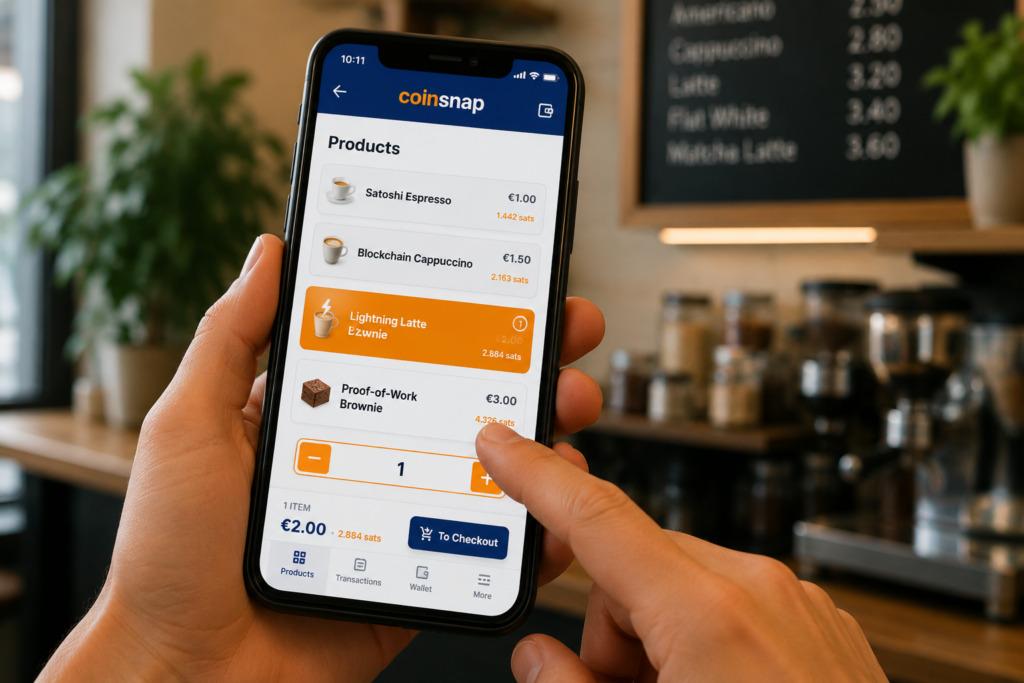
Open the Coinsnap Wallet on your smartphone or tablet and select the products you want.
The customer may optionally add a tip.
After confirmation, the app automatically generates a Bitcoin invoice.
The customer scans the QR code with their wallet and confirms the payment.
A few seconds later, the payment will be credited directly to your wallet.
Accepting Bitcoin should be this easy.
Key Features of the Coinsnap Point of Sale Wallet
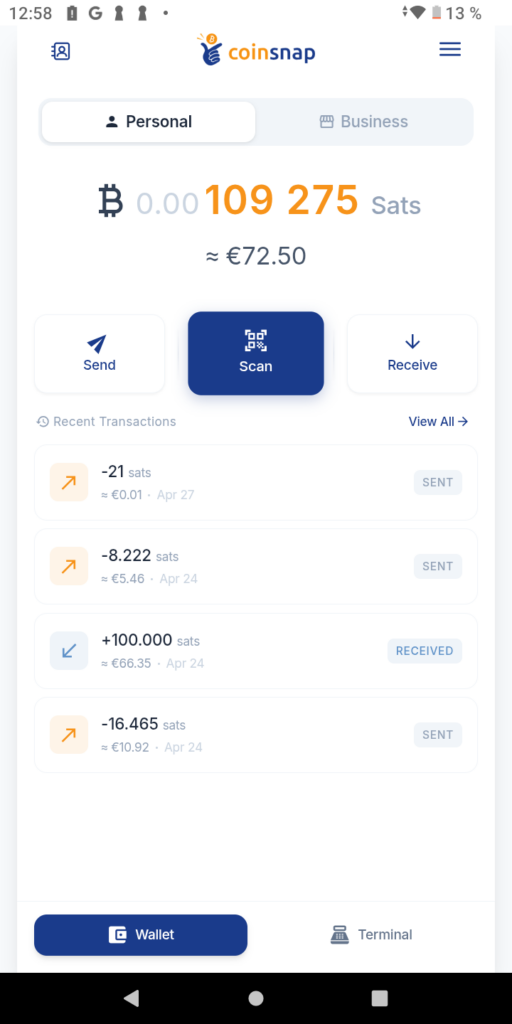
Two Wallets: Personal and Business Clearly Separated
After installation, the Coinsnap Wallet automatically creates two separate wallets:
Personal Wallet
For personal Bitcoin holdings.
For example:
- max@coinsnap.app
Business Wallet
For the company’s Bitcoin payments.
Each wallet is assigned its own Lightning address.
For example:
- meincafe@coinsnap.app
This allows you to clearly separate your personal and business Bitcoin without having to use multiple wallet apps.
Both wallets support:
- Bitcoin On-Chain
- Lightning Network
- Spark
- Send Bitcoin
- Receive Bitcoin
- Pay with Bitcoin
Since this is a self-custody wallet, you’ll receive your own recovery seed and retain control over your Bitcoin at all times.
Integrated Bitcoin Point-of-Sale System
The Coinsnap Wallet includes a built-in terminal section for in-store retail.
There, you can enter prices for products and services.
The cashier selects the desired items, and the receipt is generated automatically.
Alternatively, you can enter any amount at any time.
This makes the wallet suitable for:
- Cafés
- Restaurants
- Food Trucks
- Hotels
- Retail trade
- Service provider
- Market stalls

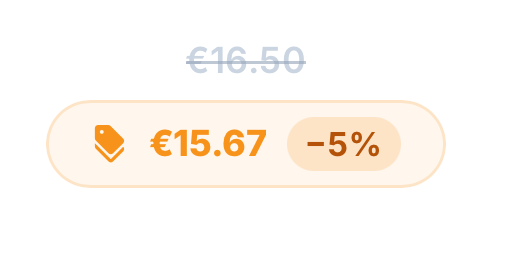
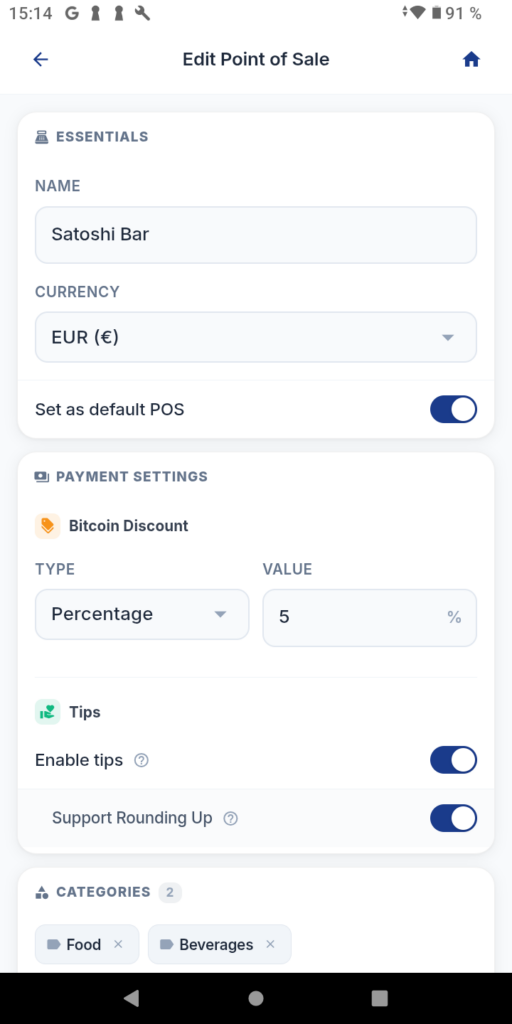
Bitcoin Discounts for Bitcoin Payers
Many merchants want to actively promote Bitcoin payments.
To that end, the Coinsnap Wallet offers a built-in discount feature.
The merchant can set a percentage-based Bitcoin discount, such as a 5% discount on Bitcoin payments.
The discount will be applied automatically.
This creates an additional incentive for customers to pay with Bitcoin.
Tipping Feature
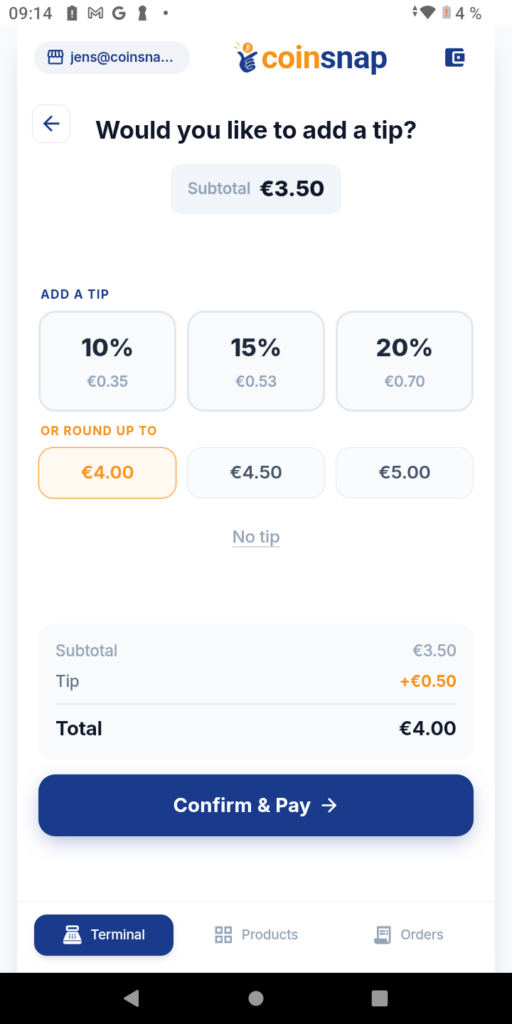
For restaurants, cafes, bars, and service businesses, the Wallet offers a built-in tipping feature.
Customers can voluntarily add a tip during checkout.
Of particular interest:
Revenue can be deposited directly into the company’s Business Wallet, while tips are automatically paid out to the employee’s Personal Wallet.
Employees receive their tips immediately and transparently.
At the same time, the business owner retains full control over the company’s funds.
Analytics and CSV Export
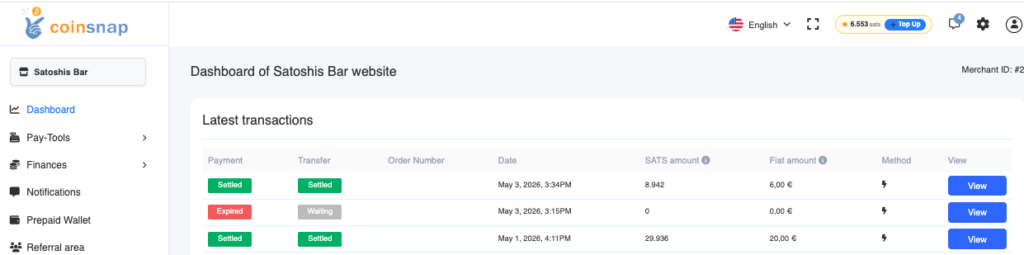
The Coinsnap Wallet offers an analytics section with real-time data.
There, you can analyze sales and transactions.
In addition, all data can be exported as a CSV file.
This makes it easier to:
- Accounting
- Tax Consulting
- Reporting
- Sales Analyses
Install and Set Up the Coinsnap Wallet
Download the Coinsnap Wallet
The Coinsnap Point of Sale Wallet is available for free on Android and iPhone.
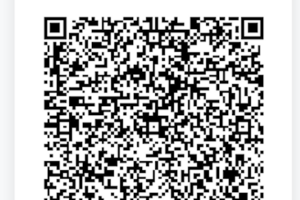
You can either scan the QR code shown here to go to the App Store.
Or you can search for“Coinsnap Wallet”in the Apple App Store or Google Play Store.

Or you can just follow the links:
- Apple Store: https://apps.apple.com/in/app/coinsnap-pos-wallet/id6769816901
- Android Play Store: https://play.google.com/store/apps/details?id=io.coinsnap.poswallet
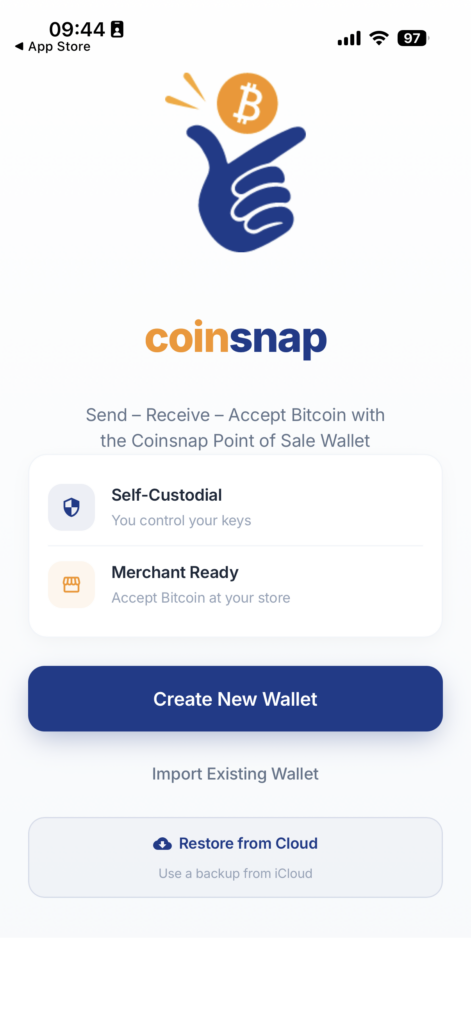
Create a New Wallet
After launching the app for the first time, you can choose between:
- Create a New Wallet
- Import an existing wallet
New users should select “Create a New Wallet.”
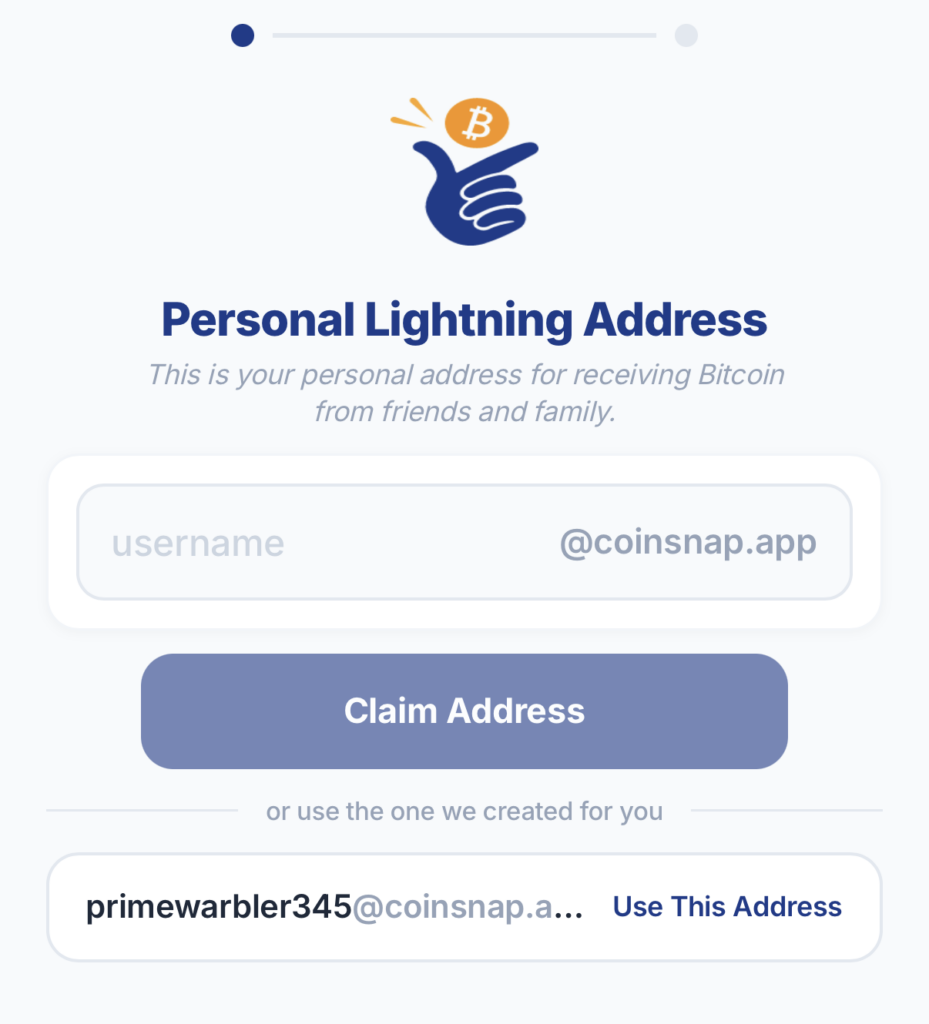
Set Up a Personal Wallet
In the next step, you’ll set the Lightning address for your personal wallet.
Example: max@coinsnap.app
You can use this address to receive Bitcoin via Lightning later.
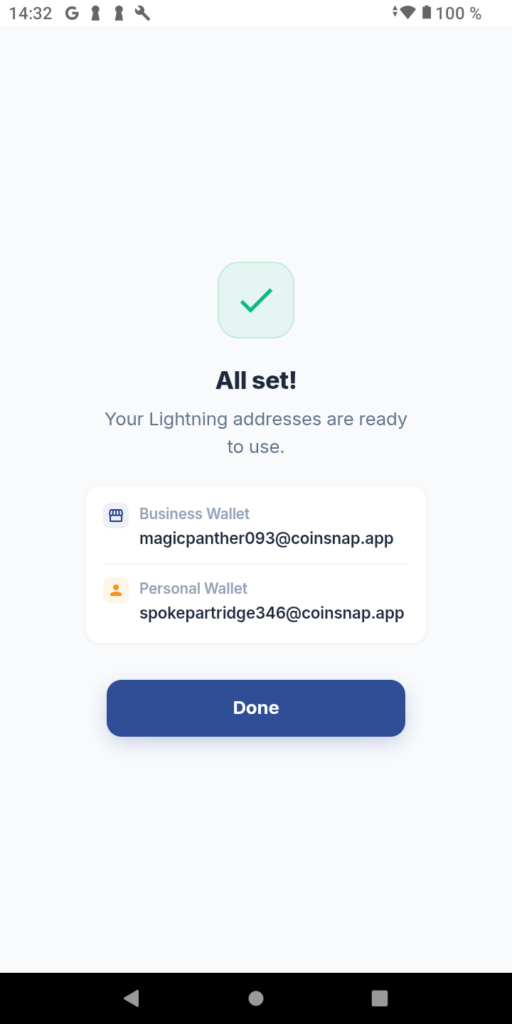
Set Up Business Wallet
Next, set up the Lightning address for your business.
Examples:
- cafe@coinsnap.app
- hotel@coinsnap.app
- shop@coinsnap.app
This address will be used later for business payments.
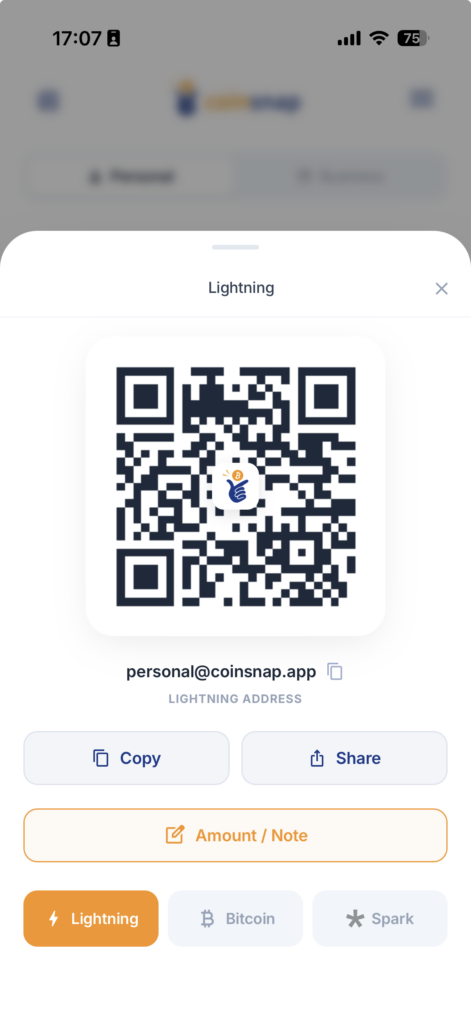
Receive Bitcoin
You can receive Bitcoin using the “Receive” feature.
The amount can either:
- be freely chosen
- or be specified by the payee (merchant)
The Coinsnap Wallet supports:
- Lightning
- Bitcoin On-Chain
- Spark
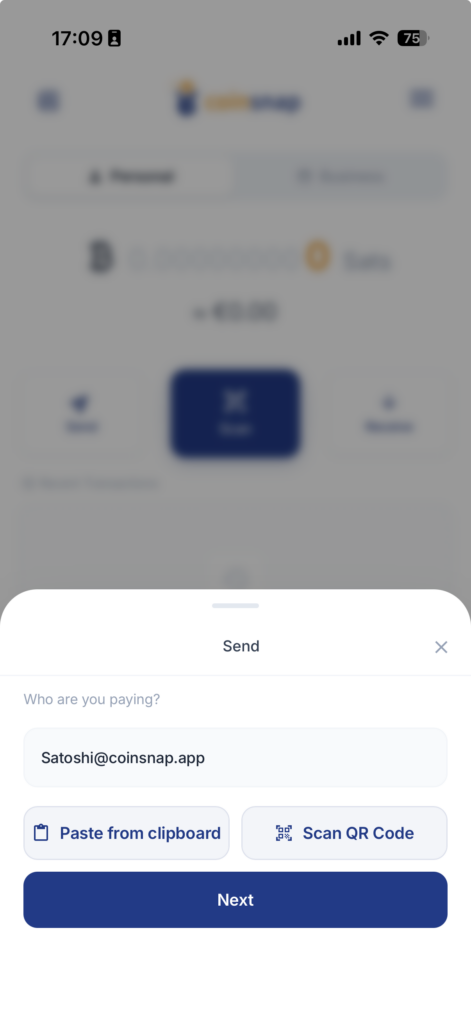
Send Bitcoin
You can use the “Send” button to send Bitcoin to other wallets.
The following are supported:
- Lightning Addresses
- Lightning Invoices
- Bitcoin Addresses
- QR codes
Configure the terminal
The following will be set up in the terminal area:
- Products
- Employees
- Drinking Tips
- Discounts
This means the smartphone is immediately ready for Bitcoin payments in stores.
Back Up Data
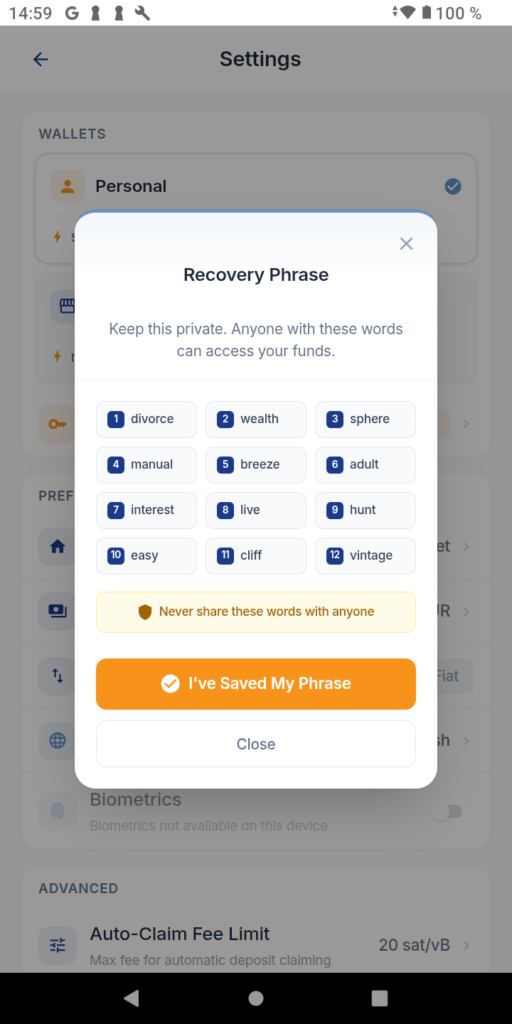
As with any self-custody wallet, you should back up your recovery seed immediately after setting it up.
Important Rules:
- Store offline
- No photography
- Do not save digitally
- Never share this with anyone
- Never share this with anyone or enter it on a website
The wallet can only be restored using the recovery seed.
Conclusion: The easiest way to accept Bitcoin in your store
The Coinsnap Point of Sale Wallet solves one of the biggest challenges facing Bitcoin adoption in brick-and-mortar retail:
A merchant can start accepting Bitcoin in just a few minutes.
Install the app.
Create a wallet.
Receive Bitcoin.
Payments are credited directly to your own self-custody wallet.
Employees can accept payments and receive tips without having access to the company’s Bitcoin.
This makes the Coinsnap Point of Sale Wallet ideal for both merchants and Bitcoin users who want to finally recommend a simple solution to their favorite store for accepting Bitcoin payments.
If accepting Bitcoin is supposed to be as easy as installing an app, then the Coinsnap Point of Sale Wallet comes very close to achieving that goal.
FAQ
What is the Coinsnap Point of Sale Wallet?
The Coinsnap Point of Sale Wallet is a self-custody Bitcoin wallet with a built-in point-of-sale system. Merchants can use it to accept Bitcoin and Lightning payments directly into their own wallet.
How can a merchant accept Bitcoin payments?
With the Coinsnap Point of Sale Wallet, merchants install the app, set up their wallet, and can immediately start accepting Bitcoin and Lightning payments.
Does the Coinsnap wallet support Lightning?
Yes. The wallet supports Lightning payments, Lightning addresses, and Lightning invoices.
Is Bitcoin credited directly to your own wallet?
Yes. Payments are transferred directly to the merchant’s self-custody wallet.
Can employees accept Bitcoin payments?
Yes. Employees can accept payments without gaining access to the company’s Bitcoin.
Does the Coinsnap Wallet support tips?
Yes. Tips can be automatically deposited into the respective employee’s wallet.
What types of businesses is the Coinsnap Wallet suitable for?
The wallet is suitable for restaurants, cafes, hotels, food trucks, retail businesses, service providers, and any business that wants to accept Bitcoin payments.
What fees are associated with the Coinsnap Wallet?
The Coinsnap Wallet itself is free to use. There are no monthly base fees, no setup fees, and no ongoing costs for simply using the wallet.
Users can receive, send, and pay with Bitcoin, as well as make Lightning, Spark, and Bitcoin on-chain transactions.
As with any Bitcoin wallet, the only costs involved may be the applicable network fees:
Receiving Payments:
- Lightning: Free
- Spark: Free
- Bitcoin On-Chain: approx. 99 sats claim fee
Sending Payments:
- Lightning: approx. 0.25% plus routing fees
- Spark: Free
- Bitcoin On-Chain: Bitcoin Network Fee
The actual network fees are determined by the respective Bitcoin or Lightning network and are not set by Coinsnap.
Fees for Additional Coinsnap Services
In addition to the wallet, Coinsnap offers optional services for merchants that can be accessed directly through the app’s terminal section.
These include, for example, advanced merchant features and payment services provided through the Coinsnap infrastructure.
For payments processed through these optional Coinsnap services, Coinsnap charges a service fee of 1% of the payment amount.
Use of these additional services is optional. Merchants can also use the Coinsnap Wallet without these services and receive Bitcoin payments directly into their own self-custody wallet.
Can individuals also use the Coinsnap Wallet?
Yes. Although the Coinsnap Wallet was developed specifically for merchants and for accepting Bitcoin payments, it is also suitable for individuals.
With the Coinsnap Wallet, users can:
- Sending and Receiving Bitcoin
- Make Lightning Payments
- Using Bitcoin On-Chain
- Use Spark Payments
- Receive payments using your own Lightning address
- Paying with Bitcoin at Retailers
Every installation automatically includes a personal wallet for private Bitcoin holdings. If you also want to accept Bitcoin payments on behalf of a business or organization, you can use the built-in business wallet for that purpose.
This makes the Coinsnap Wallet suitable both as an everyday Bitcoin wallet for end users and as a Bitcoin point-of-sale system for merchants.
Who has access to a merchant’s Bitcoin?
The Bitcoin is credited directly to the merchant’s self-custody wallet. Employees can accept payments and operate the point-of-sale system, but they do not have access to the company’s Bitcoin holdings.
Tips can be automatically paid out to an employee’s personal wallet upon request, while the sales revenue remains in the company’s business wallet.
This separation of business funds and employee tips is particularly relevant for restaurants, cafes, bars, and other service establishments.
Start accepting Bitcoin in your store today with Coinsnap’s point-of-sale wallet
The Coinsnap Point of Sale Wallet is available for free on Android and iPhone.
You can either scan the QR code shown here to go to the App Store.
Or you can search for“Coinsnap Wallet”in the Apple App Store or Google Play Store.
Or you can just follow the links:
- Apple Store: https://apps.apple.com/in/app/coinsnap-pos-wallet/id6769816901
- Android Play Store: https://play.google.com/store/apps/details?id=io.coinsnap.poswallet