Blink for BTCPay Server
Blink Wallet as Lightning Service Provider (LSP) for BTCPay Server
Use the Blink Wallet as a Lightning Service Provider (LSP) for BTCPay servers to receive Bitcoin Lightning payments (Blink BTCPay). You use a BTCPay server and want to accept Lightning payments but do not want to operate your own Lightning Node?
Then use the Blink plugin for the BTCPay server (Blink BTCPay) to use Blink as a Lightning service provider and receive Lightning payments via your BTCPay server.
Install the Blink plugin on your BTCPay server and connect it to your Blink Wallet.
We explain how this works in this article
- How do I install the Blink plugin on my BTCPay server?
- How do I get a Blink Wallet?
- How do I connect my BTCPay server to Blink?
On the YouTube channel of Coincharge we have published a video with the topic“Blink for BTCPay Server“
What is the Blink Wallet or BTCPay Server?
The Blink Wallet is a Bitcoin Lightning Wallet with one Bitcoin and one dollar account.

A BTCPay server is an open source software solution that you can run on your own server. You can then use your own BTCPay server to accept Bitcoin payments.
To be able to accept Lightning payments in addition to on-chain payments, you must operate your own Lightning Node. If you are afraid of the effort involved in operating your own Lightning Node, you can use the services of a Lightning Service Provider, or LSP for short.
These LSP services are provided by Blink. With the help of the Blink plugin, the Lightning functionality can be integrated into your BTCPay server.
This means that in addition to Bitcoin Onchain, you can also receive Lightning payments via the BTCPay server, which are then credited directly to your Blink Wallet.
Install Blink on the BTCPay server
If you operate your own BTCPay server, you must install the Blink plugin.
If you do not operate your own BTCPay server, but use a BTCPay server, please ask the operator of the BTCPay server to install the Blink plugin. If you use the BTCPay server of Coincharge, the Blink plugin is already available.
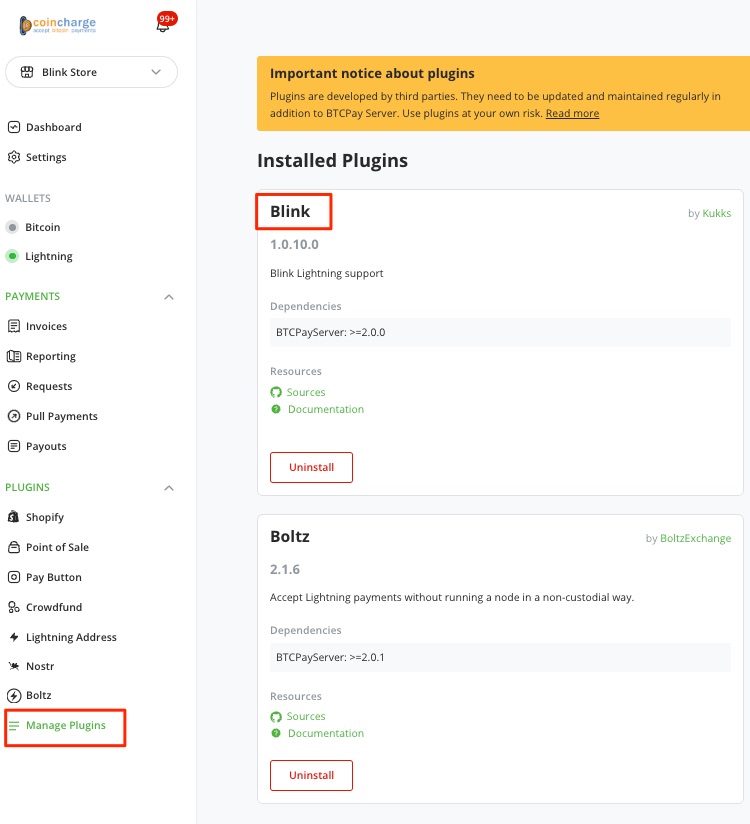
If you run your own BTCPay server, log in to your BTCPay server as an admin and search for the Blink plugin under Plugins and click on Install.
Blink Wallet
To be able to use Blink as an LSP, you first need a Blink Wallet. If you have not already done so, you can create a corresponding Blink Wallet at https://blink.sv/.
We have already created a detailed video about the Blink Wallet. The link to the video: YouTube Video: Installing, setting up and using the Blink Wallet – detailed step-by-step instructions

Blink Dashboard
If you have a Blink Wallet, log in to the Blink Dashboard by visiting the website: dashboard.blink.sv.
You can log in to the Blink Dashboard with either your e-mail address or your telephone number.
You will then be sent a code that you must enter.

The dashboard then looks like this. The two accounts at the top. The Bitcoin account on the left and the dollar account with your corresponding balance on the right.
Blink API Key
We need an API key from Blink, which we can find on the left under the menu item API Keys.
At the top right we have the option to create such an API key.
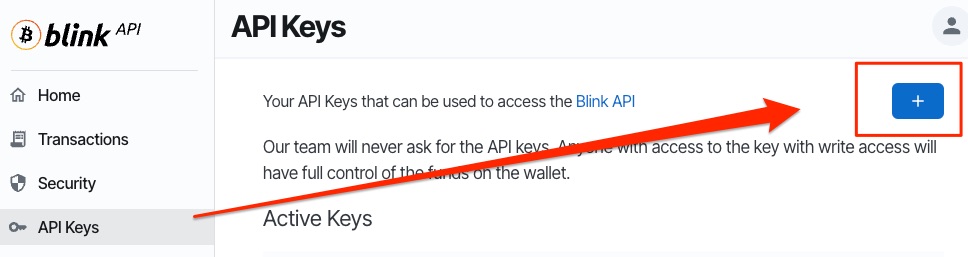
We need an API key from Blink, which we can find on the left under the menu item API Keys.
At the top right, we have the option of creating such an API key.
First, we specify what we want to call the API key internally. For example, BTCPay Server.
The key should never expire, so we leave the setting at Never.
Then we need to specify which rights the API key should have. This depends on what we want to use the API key for.
As we only want to receive Lightning payments via the BTCPay server, it is sufficient for Lightning invoices to be created. Accordingly, we need the Read and Receive rights.
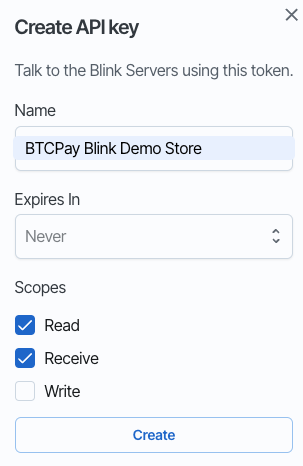
We only need the rights for Write if we also want to send Lightning payments via the BTCPay server. This would be the case if you want to use the pull payments function of the BTCPay server.
As this is not usually the case, we recommend deactivating the write rights.
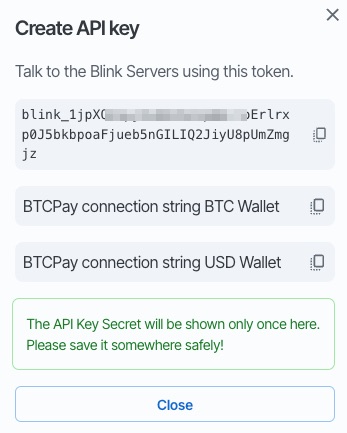
Then click on Create and receive the desired API key.
We then have the option of choosing between two connection strings.
Here you have to decide to which Blink account the transactions should be credited. If the credit is to be made to the Blink Bitcoin Wallet, select the upper connection string.
If you want to protect yourself from the volatility of Bitcoin and prefer a credit in dollars, then use the second connection string. You can also use this if your online store displays prices in euros. Your euro sales will then be credited in US dollars.
BTCPay Server Lightning settings
This connection string must now be stored in our BTCPay store under Blink.
To do this, log in to the BTCPay server and go to the corresponding store for which Blink is to be used.
Under Wallet there is the item Lightning and under Settings.
You will then be asked which Lightning Node is to be used and we decide on the Lightning Node from Blink.
To do this, we select Use Custom Node.
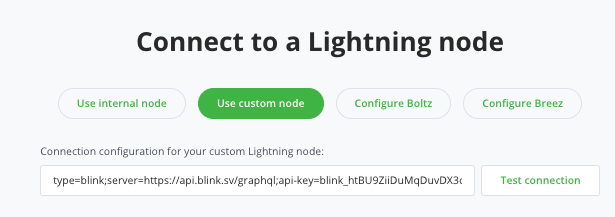
Then enter the connection string in the field to which the credit is to be made. So either the connection string for the Bitcoin wallet or for the USD wallet.
Click on Save at the bottom and then on Test Connection.
If we have done everything correctly, a message will appear in the green field at the top that everything has worked.
We then return to the BTC Lightning settings.
Lightning should be enabled here and then you have three options to choose from. I like to activate all three and don’t forget to click on Save.
Test payment
Then we want to try out whether everything works the way we want it to.
I like to test via the payment button of the BTCPay server. You can find it in the menu on the left.
Then I enter an amount. For example 1 ,- and then click on the green button here.

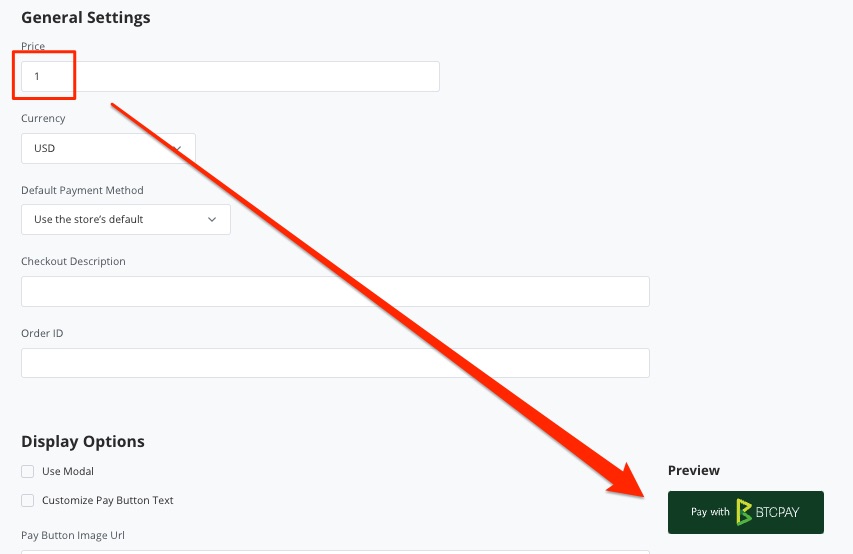
I’ll now pay with a Bitcoin wallet and then check whether the payment has arrived on my Blink wallet.
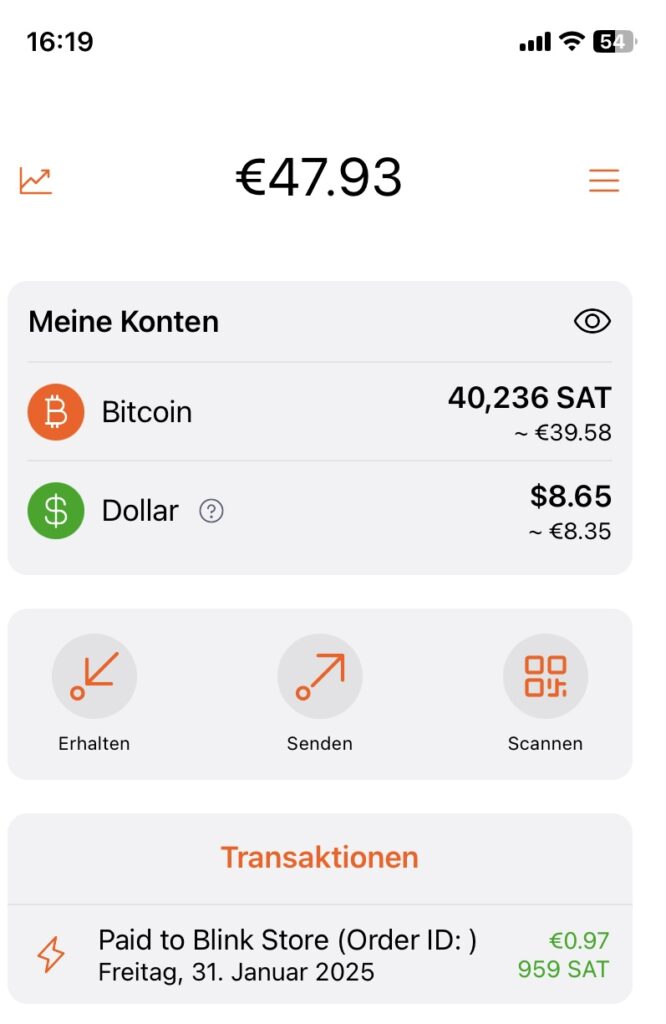
We can also check this again in the Blink Dashboard and go to the Transactions menu item.
We can also find the corresponding transaction listed here.

Summary
You can use the Blink Wallet to accept Lightning payments in your BTCPay Store. This is possible if you operate your own BTCPay server and also if you share a BTCPay server.
Blink saves you from having to operate your own Lightning Node. Operating your own Lightning Node is a recommendable experience, but is unfortunately also very time-consuming.
Now you can receive your Bitcoin on-chain transactions directly on your own Bitcoin wallet via your own or shared BTCPay server and also receive the Lightning transactions for Bitcoin Lightning directly on your own Blink Lightning wallet.