Skip to content
0,00 €
  • Home
  • Bitcoin
  • Lightning
  • Accept
  • Wallet
  • Payment
  • BTCPay
  • Coinsnap
  • Blog
  • YouTube
  • Agency
    • Coincharge – Bitcoin payment processing agency
    • Coincharge products and services
    • Contact
  • English
    • German
CoinchargeCoincharge
  • Home
  • Bitcoin
  • Lightning
  • Accept
  • Wallet
  • Payment
  • BTCPay
  • Coinsnap
  • Blog
  • YouTube
  • Agency
    • Coincharge – Bitcoin payment processing agency
    • Coincharge products and services
    • Contact
  • English
    • German

Create Bitcoin checkout page for BTCPay

BTCPay Bezahlseite
BTCPay Bezahlseite

Create Bitcoin checkout page for BTCPay

Create custom Bitcoin checkout page for BTCPay

How to create a custom Bitcoin checkout page for the BTCPay server. With your logo, your colors and in your individual design.

Set up and administer BTCPay Shop In addition to the design, it explains other setting features and functions that can be displayed to the customer on the Bitcoin Checkout page.
BTCPay Bezahlseite

Customize Bitcoin Checkout Page for BTCPay Shop

How to create a custom Bitcoin checkout page for your BTCPay store. The payment page in the design of your online store based on the BTCPay server.

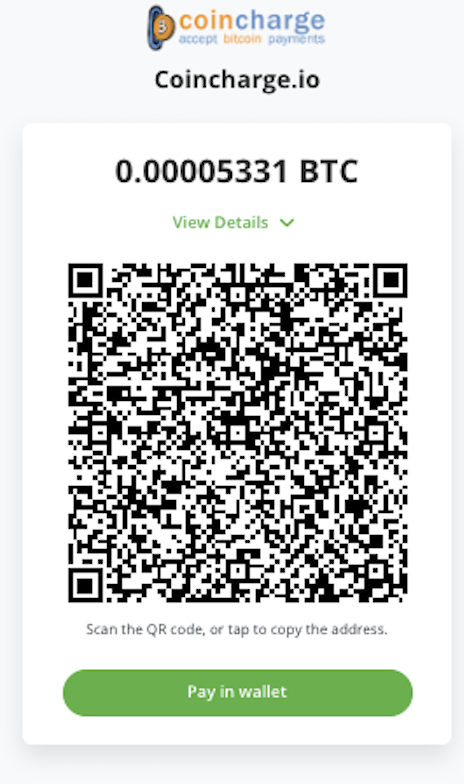
Since BTCPay Server version 1.7 there is a new possibility to customize the payment page (Checkout Page). The payment page is the page that is displayed to the payer when the order is placed.

You can store your own logo and set your own colors. All the customer sees otherwise is a QR code for payment. A QR code used for both Lightning payments and Bitcoin payments. The customer no longer has to make a selection. Simply open your Bitcoin or Lightning wallet, scan the QR code and make the payment.

YouTube video: Creating a BTCPay payment page (english subtitle)

On the German YouTube channel of Coincharge there is a video in the BTCPay playlist with the title: “Erstelle Deine individuelle Payment Page / Checkout Page für den BTCPay Server“.

Create your individual payment page for the BTCPay server

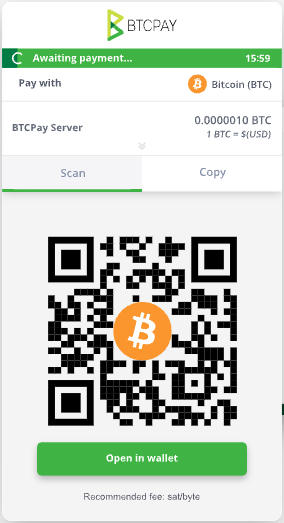
Until now, the BTCPay payment page looked by default like the picture on the right. With the BTCPay logo, in green and the payer had to choose whether to pay with Bitcoin or Lightning.

In addition, a variety of other information was displayed that was rather confusing to the payer.

The new design is sleek and simple and focuses on pure Bitcoin or Lightning payments.
BTCPay Bezahlseite früher

Store Settings => Checkout Appearance

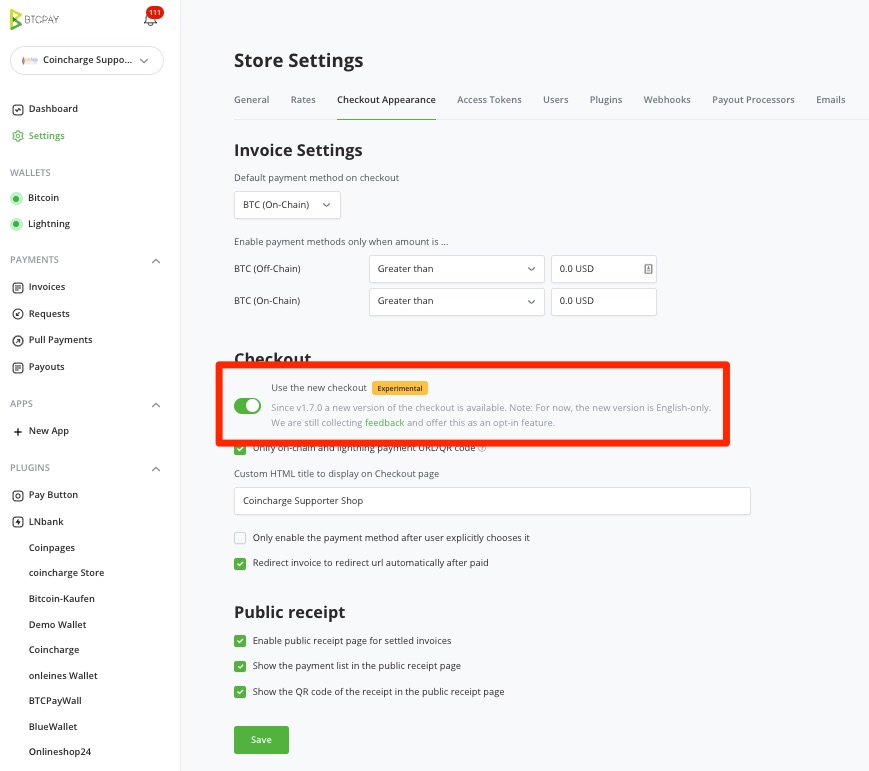
To customize the BTCPay payment page, log in to your BTCPay store and go to the Settings section.

The corresponding store settings are displayed here. We will first go to the Checkout Appearance section.

In the Checkout Appearance section there is a Checkout section.

Here the menu item “Use the new checkout” is activated. In the future versions of BTCPay Server, this option will be enabled by default.
BTCPay Bezahlseite Checkout appearance

Additionally, make sure that the “Unify on-chain and lightning payment URL/QR code” option is also enabled. This option ensures that the previously separate QR codes for Lightning payments and Bitcoin payments are now displayed in one common QR code.

It then doesn’t matter whether the payer uses a Lightning Wallet or a Bitcoin Wallet to make the payment. The QR code recognizes both payment methods and can accept the payment.

In the field “Custom HTML title” you can enter what will be displayed to the customer as the store name.

Store Settings => General

After that, we switch to the General section within the Store Settings.

In the General section there is the Branding section.
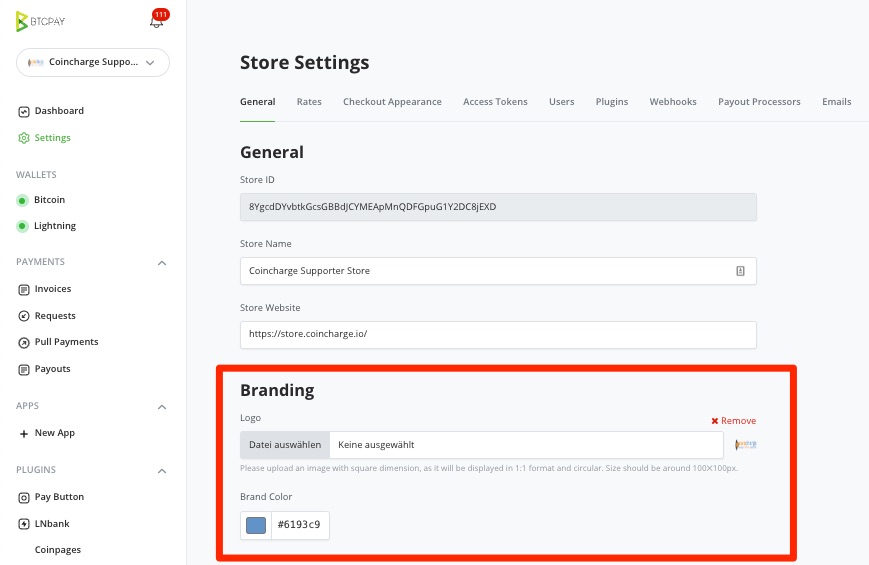
BTCPay Bezahlseite Branding

Here you can select your own logo, which will then be displayed in the payment page. Just click Select File and choose the file on your own computer. It is recommended to use a square logo. The logo is displayed centered on the BTCPay payment page.

In the Brand Color area, you can define your own color.

Now just make a test order in one store to check if all settings have been applied correctly.

Those who want to see how the modified payment page looks in practice can place a test order in the Coincharge Supporter Store at: https://store.coincharge.io/.
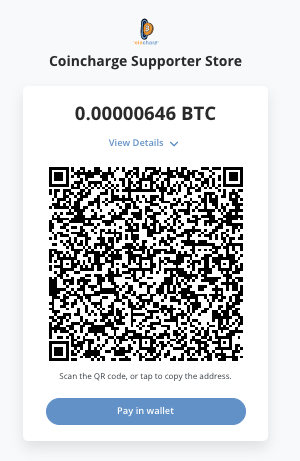
BTCPay Bezahlseite Coincharge

Coincharge products and services

BTCPay Server Install and Setup Select options This product has multiple variants. The options may be chosen on the product page

BTCPay Server Install and Setup

Product

249,00 € – 299,00 €Price range: 249,00 € through 299,00 €

Plus 19% VAT
Delivery Time: sofort lieferbar
Coincharge BTCPay Store Install and Setup Select options This product has multiple variants. The options may be chosen on the product page

Coincharge BTCPay Store Setup and Installation

Product

249,00 € – 449,00 €Price range: 249,00 € through 449,00 €

Plus 19% VAT
Delivery Time: not specified
Bitcoin Consulation Make an appointment

Consultation meeting

Product

0,00 €

Plus 19% VAT
Delivery Time: not specified
Tags: btcpaycheckout pagePayment pagePayment Page

You also might be interested in

Accept USDT payments with the BTCPay Server

Accept USDT payments with the BTCPay server

Aug 25, 2025

Accept USDT payments with the BTCPay server If you already[...]

Bitcoin WooCommerce Plugin

The 5 best Bitcoin WooCommerce plugins for Bitcoin payments (2025)

Sep 7, 2025

The 5 best Bitcoin WooCommerce plugins for Bitcoin payments (2025)[...]

Use xPub Key from Raspiblitz with external BTCPay Server

Jul 12, 2021

Use xPub Key from Raspiblitz with external BTCPay Server In[...]

Leave a reply

Search

Coinsnap

Accept Bitcoin with Coinsnap

Recent Posts

  • AI agents pay on their own
  • Coinsnap Point of Sale Wallet
  • Why internet booking engines should integrate Bitcoin payments
  • Accept Bitcoin at the hotel
  • Bitcoin acceptance 2026: What the River study shows about merchants and bitcoin payments
  • Spark explains: The last-mile solution for Bitcoin payments?
  • Lightning is not dead
  • Set up the BTCPay Boltz plugin
  • How can I accept Bitcoin?
  • Bitcoin im Baukastenshop akzeptieren – auch ohne Plugin oder API

Categories

  • Accept Bitcoin and Lightning
  • Bitcoin
  • BTCPay
  • Coinsnap
  • Lightning
  • Lightning Wallet
  • Payment processing
  • Uncategorized

Tags

Accept Bitcoin Accept Lightning Alby Bitcoin Paywall Bittr blink Blixt Blue Wallet Breez btcpay BTCPayWall BTCPay WordPress Integration Cashu Chaumian eCash Coinsnap Custodial ecash electrum jimdo Lightning Address Lightning Login Lightning payments Lightning Paywall Lightningtipbot lightning wallet lnbits LNPoS LNURL Mint Opago opennode Phoenix Pocket Point of Sale Relai shopify Shopware Speed TPos Wallet of Satoshi woocommerce WordPress WordPress Bitcoin Plugin Zaprite zeus

Accept Bitcoin

Coincharge supports merchants to accept Bitcoin and Lightning as payment methods.

You can find all the information you need to integrate Bitcoin and Lightning into your business or online store on Coincharge.

Partnership

  • Coinsnap - Bitcoin & Lightning Payment Provider
  • Coinpages - Bitcoin Directory
  • BTCPayWall - Sell Content and Digital Goods

Tipping Box

Coincharge – About us

  • Coincharge - Bitcoin payment processing agency
  • Coincharge - Products and Services
  • Coincharge BTCPay Store
  • Contact

© 2026 · coincharge.io ist ein Service der Internetactive GmbH

Prev Next
Support