This is how you can receive donations in Bitcoin.
We explain how you can receive donations in Bitcoin on your website. With a Bitcoin donation page you can receive financial donations from the readers and visitors of your website.
You can receive Bitcoin donations as a non-profit organisation, but also as a YouTuber from your viewers and followers or as the operator of a website and blog.
Create a separate Bitcoin donation page or integrate donation banners and notices into the sidebar of your website.
In this post we explain how you can integrate different formats on your website to receive Bitcoin donations.

You run a website or a blog and want to be supported for your work?
Then we will introduce you here to the various ways in which you can receive financial support as Lightning and accept Bitcoin donations with the help of a BTCPay server.
We present the following Bitcoin donation functions:
For all the solutions presented here, a
- BTCPay Store on a BTCPay Server
- Bitcoin Wallet
is required.
Bitcoin Donation Button
Within the configuration of a BTCPay store, there is the menu item Pay Button.
This menu item can be used to create a Bitcoin Donation Button.
The BTCPay Bitcoin Donation Button can be configured in different ways.
Either as shown on the right with a suggested amount, which the donor can then adjust with plus and minus.
The currency can be specified. We have chosen euros in this example. You can also add your own logo or image.
To make the Bitcoin donation, click on the button “Donate me with Bitcoin”.
The payment page with QR code then opens and the donor can make his Bitcoin payment and the site operator thus receives a Bitcoin donation.
The configuration is displayed as HTML code. This HTML code can be integrated and displayed at any desired position on any website.
Detailed instructions for creating a payment and donation button can be found in the article: Bitcoin Donation Button
Bitcoin Donation Shop
The Bitcoin Donation Shop is an online shop where donors can buy virtual items and pay with Bitcoin and Lightning.

We implemented a Coincharge Supporter Store based on WooCommerce and integrated the payment methods Bitcoin and Lightning.
As products we have deposited various drinks to which one can invite us.
Anyone who wants to invite us for a beer selects the product beer and pays via Bitcoin or Lightning.
The Coincharge Supporter Store can be tried and donated to at https://store.coincharge.io/.
Bitcoin Donation Page
Create a Bitcoin Donation Page and explain to the donors what you want to use the donation for.
The Bitcoin Donation Page is a single page that describes in detail the purpose for which you would like to receive a Bitcoin donation.
The Bitcoin Donation Element is integrated within the Bitcoin Donation Page. The Bitcoin Donation element can be freely designed and adapted to the design of the website.
Your own logo can be integrated and the colours and text can be adapted.
Different amounts can already be suggested and the donor can enter his or her own desired amount in a free field.
The amounts can be specified by the site operator in Euros, USD, BTC or Sats. If, for example, a page operator specifies the amount in euros, the donor also receives the amount converted into sats.
[btcpw_tipping_page type=”new” id=”13075″]
The site operator can enable an anonymous donor. However, he can also request additional information from the donor. This can be name, address, email address or text input.
These fields can be voluntary or mandatory.
This way, site operators can issue donation receipts if required or otherwise thank people for their donation.
You can make a Bitcoin or Lightning donation using the element opposite. After you have selected an amount, additional fields will be displayed for you to fill in. Filling in the form is voluntary and you are welcome to leave it blank.
You can also send us a message this way if you like.
The Bitcoin Donation Page is implemented with the help of BTCPayWall. A BTCPay store or an account with OpenNode is required for payment processing.
Bitcoin Donation Banner / Tipping Box
Bitcoin Donation banners can be embedded in various places on your website. From a technical point of view, these elements are identical to the Donation Page.
These elements are slightly smaller and designed to be included as Donation Banners at the bottom of each page or in the sidebar or footer.
You will find these elements embedded in various places on the Coincharge website.
We have integrated the right high Donation or Tipping Banner into the sidebar.
We have integrated the small tipping box into the footer of the web pages.
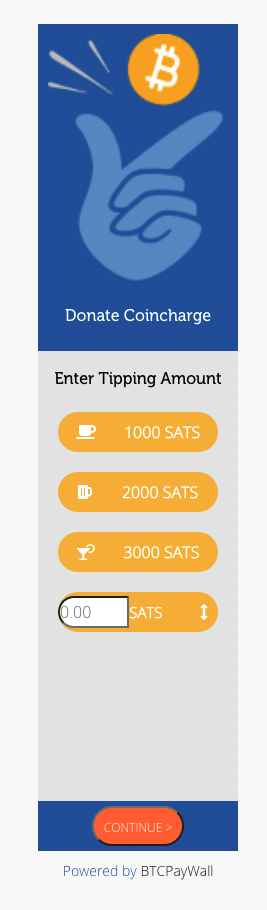
We have placed the wide Donation or Tipping Banner at the end of a post or page.
The Donation Page, the Tipping Banner and the Tipping Box were implemented with the BTCPayWall.
The BTCPayWall can be used on all websites created with WordPress.
Here you can find more information about the BTCPayWall
Install the BTCPayWall plugin on your WordPress site and you will also need a BTCPay store and a Bitcoin wallet.
BTCPay Store
In order to accept a Bitcoin donation, a Bitcoin payment transaction must be made.
Bitcoin payment processing is organized by a BTCPay store and you set up the required account on a BTCPay server.
You can run your own BTCPay server or you can use an existing BTCPay server.
Coincharge provides a BTCPay server at the address https://btcpay.coincharge.io, which you can use for free.
The donor indicates on your website how much they would like to donate. He can specify the donation amount in Bitcoin or Sats, but also in another currency, such as USD or Euro.
In the background, the amount to be donated is transferred from the Bitcoin Donation page to the BTCPay store.
The BTCPay store takes the USD or Euro commodity value and calculates the corresponding value in Bitcoin based on the current Bitcoin rate.
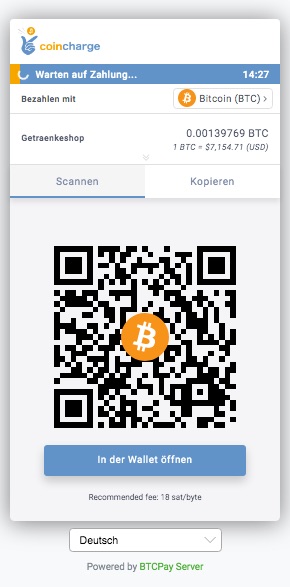
BTCPay Store creates a payment checkout page that contains all relevant information for payment.
It contains the amount to be paid in Bitcoin and the Bitcoin address to which the Bitcoin payment should be sent.
All relevant information is displayed in the form of a QR code.
The appearance of the payment page can be designed in the design of the online stores.
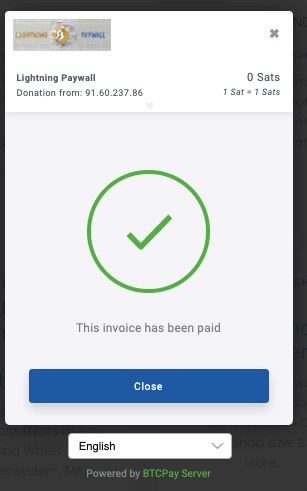
When the customer pays, the BTCPay Store verifies that the payment was properly executed.
Since a unique and unambiguous Bitcoin address is generated for each Bitcoin payment, an incoming payment can always be clearly assigned to an order.
It checks if the expected bitcoin amount has been received and credits the merchant’s bitcoin wallet with the equivalent amount.
Furthermore, the online store receives feedback about the successful Bitcoin payment and can initiate the next steps accordingly, such as processing and shipping the goods.
Bitcoin Wallet
As already written, for each order a unique Bitcoin address, which is used only once.
Each Bitcoin address belongs to a specific Bitcoin wallet, to which the Bitcoin payment receipt is credited.
As a recipient of Bitcoin donations, you need your own Bitcoin wallet to which the incoming Bitcoin are credited.
If you create a BTCPay store, you can also use it to create your own internal Bitcoin wallet.
Only you have access to this Bitcoin wallet, because you receive the private key in the form of 12 words that only you know.
The Bitcoin Wallet can be used not only to receive Bitcoin donations, but also for payments and refunds.
You can transfer your Bitcoin balance from this Bitcoin wallet to another Bitcoin wallet at any time.
Bitcoin payment processing costs
By using a BTCPay store on a BTCPay server, you are your own Bitcoin payment processor.
While you pay 2.49% + 35 cents for PayPal payment processing and comparable conditions for credit card payment, you do not pay any transaction fees for Bitcoin payment processing.
- no monthly fees
- No volume-based fees
- no transaction fees
The costs of payment processing in the form of transaction fees are borne by the payer and not the payee.
If you decide to run your own BTCPay server (which we recommend), you will have to pay for hosting the BTCPay server (at Lunanode about €5,- per month).
But you can also use Coincharge’s BTCPay server for free.
If you are technically proficient, you can use our instructions to create a BTCPay store including a Bitcoin wallet and connect it to your online store. You can already accept Bitcoin donations.
If you do not want to do the technical integration yourself, you can also have Coincharge do it for you. You can find more information under: “Coincharge Products and Services

Summary: Accept Bitcoin donation
It has never been easier to accept Bitcoin donations.
Proceed as follows:
- Creation of a BTCPay Store at: https://btcpay.coincharge.io
- Creation of an internal Bitcoin wallet or deposit of the xPub key of an external Bitcoin wallet
- Depending on which donation function you want to use:
- Bitcoin Donation Button – Create a Bitcoin Donation Button in the BTCPay Store and integrate the HTML code into your website.
- Bitcoin Donation Shop – Create a Bitcoin Donation Shop with an online shop software such as e.g. For the use of the BTCPayServer, corresponding store modules are available for the following store software:
- Bitcoin Donation Page – Install the BTCPayWall Plugin on your WordPress Site
I am text block. Click edit button to change this text. Lorem ipsum dolor sit amet, consectetur adipiscing elit. Ut elit tellus, luctus nec ullamcorper mattis, pulvinar dapibus leo.