
Raspiblitz BTCPay Server
Raspiblitz BTCPay Server
BTCPay Server on the Raspiblitz
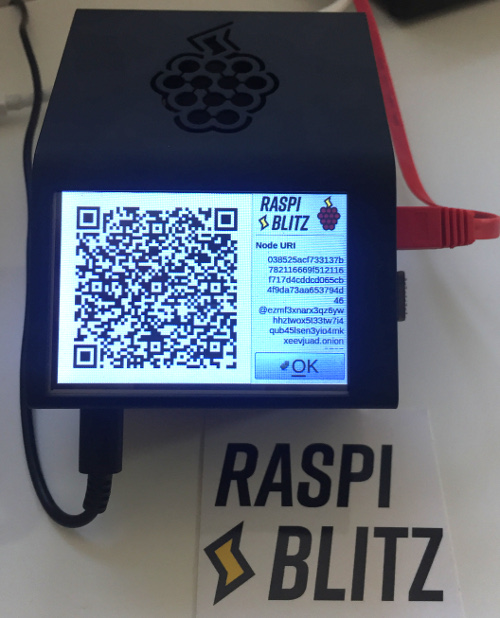
The Raspiblitz is a hardware node that allows you to run your own Bitcoin and Lightning node. On the Raspiblitz, an own BTCPay server can be operated as an additional application.
There are other hardware node providers such as Nodl, MyNode and Umbrel which also support BTCPay server. With these providers, calling the BTCPay server from the Internet is almost impossible and therefore only possible for use in your own home network.
As an operator of a website or online store, customers should be able to pay with Bitcoin and Lightning. This requires that for payment processing the Internet online store interacts with the BTCPay server on the Raspiblitz in the home network.
The Raspiblitz offers a unique solution for this with the IP2TOR service.
If you want to run your own hardware node with a BTCPay server to accept Bitcoin payments in your online store, the Raspiblitz is the right solution.
If you don’t have a Raspiblitzyet, you can buy one from Fulmo Shop as a complete hardware node. There you will also find instructions and further information if you want to assemble a Raspiblitz yourself.
The following describes how to set up and operate the Raspiblitz for use with the BTCPay Server.
Accessibility of the Raspiblitz BTCPay Server via the Internet
In most cases, the Raspiblitz is operated in a home network from home or office.
The use within the own network is usually unproblematic. The problem occurs when you want to access the Raspiblitz from outside.
However, this is required if a Bitcoin payment is made via the online store and the payment processing is carried out via the BTCPay server.
External access from the Internet to the home network and thus to the Raspiblitz with the BTCPay server is prevented by the Internet provider and the connected router.
Most of the time, you only become aware of this problem when you want to connect your online store (for example, WooCommerce) to the BTCPay server.
This does not work because the online store is on the Internet and tries to connect to the Raspiblitz BTCPay server on the home network.
Gate activation
This problem can be solved by calling the Raspiblitz BTCPay server via the Tor network.
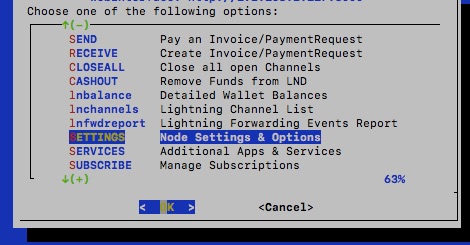
Via the Raspiblitz web interface you can access the settings for “Node settings & options” under Settings.
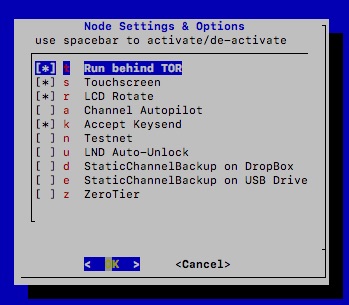
Accordingly, the “Run behind Tor” field must be activated under “Node Settings & Options”.
Activate BTCPay Server on the Raspiblitz
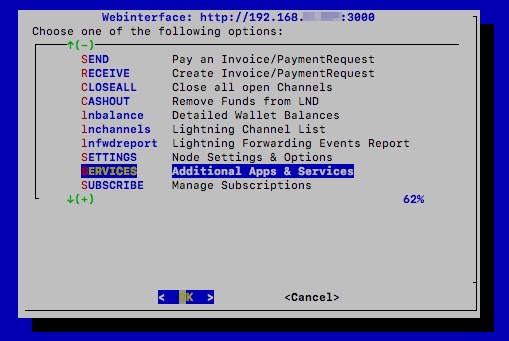
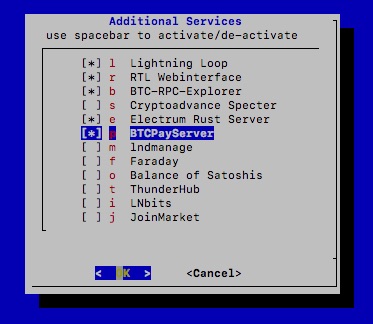
After Tor has been set up on the Raspiblitz, we want to enable the BTCPay server and go to “Additional Services”.
Here the BTCPayServer is selected and confirmed with OK.

After the installation has been completed successfully, the window shown opposite appears:
Here we are told how to access the BTCPay server within our local network using the internal IP address with any internet browser.
In addition, we receive the Tor address through which the BTCPay server can be accessed via a Tor browser. With the help of the TOR Browser Hidden Service address and a TOR Browser, the Raspiblitz BTCPay Server can also be accessed from outside the home network.
The Raspiblitz BTCPay server can be called via these two addresses.
Set up Raspiblitz BTCPay Server
After the Raspiblitz BTCPay server has been activated, you must first register and log in to your own BTCPay server.
The account created first is automatically created as the administrator account.
You can find the information about the administration of the BTCPay Server under BTCPay Server Setup & Administration.
Instructions on how to set up BTCPay stores on this BTCPay server can be found at:
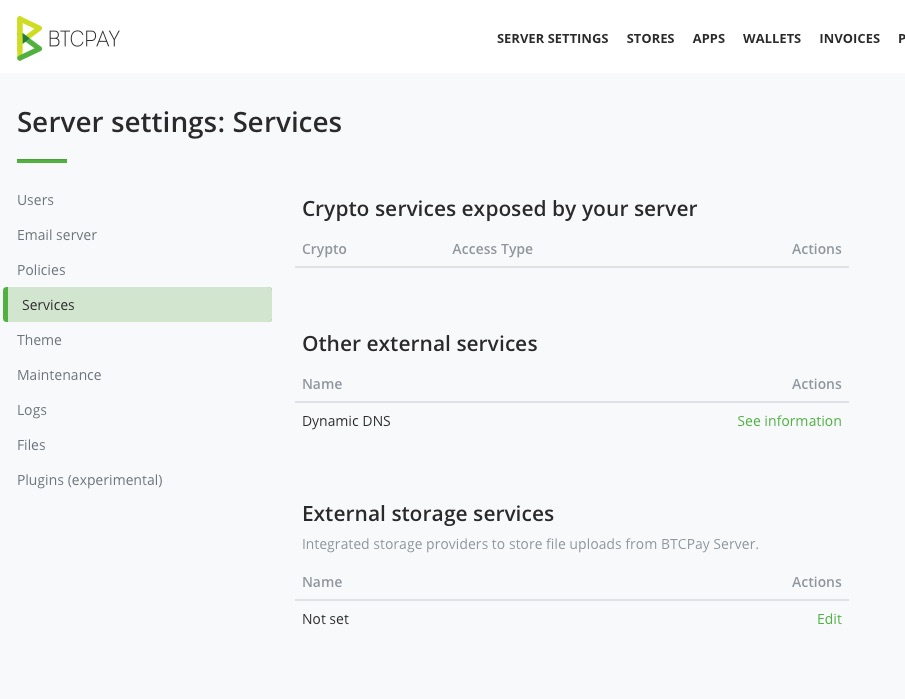
With the Raspiblitz BTCPay Server, fewer services are displayed under Server Settings -> Services than with an installation via Docker or Lunanode.
The services otherwise listed here, such as Lightning and Ride the Lightning (RTL), are called up on the Raspiblitz via the Raspiblitz menu.
Reach Raspiblitz BTCPay Server from the Internet
Within its own network, the Raspiblitz BTCPay server can be accessed with any normal Internet browser via the IP address.
With a Tor Browser and the Tor Browser Hidden Service address, the Raspiblitz BTCPay Server can also be accessed from the Internet.
If a customer wants to pay with Bitcoin, then he will be shown a Bitcoin payment page. This payment page must be viewable with any Internet browser, as we cannot force the customer to use a TOR browser.
Therefore, the Bitcoin payment page is displayed on the Internet as a normal web page and the request is forwarded as a TOR request via the TOR network to the Raspiblitz BTCPay server in the home network.
For this purpose, Raspiblitz offers a service called IP2TORBridge.
IP2TOR Bridge
The IP2TOR service is a chargeable additional service that can be booked separately. This service is paid for by Lightning invoice via your Lightning Node. Therefore, you should have set up a few public channels for your Lightning Node beforehand and ensured sufficient liquidity.
The service is accessed via the main menu and then Subscribe – Manage Subscription.
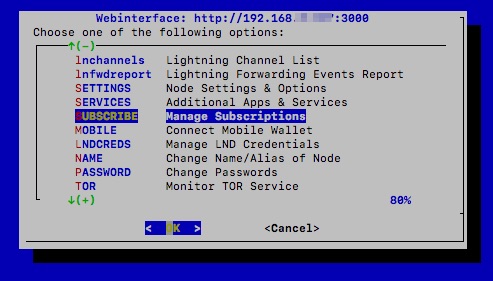
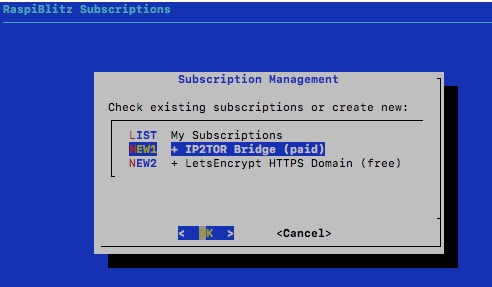
The available Subscription Services are listed.
We select IP2TOR and get an overview of the available bridges. Accordingly, we select that we want to open an IP2TOR bridge to BTCPay.
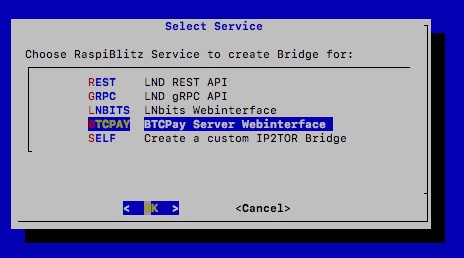
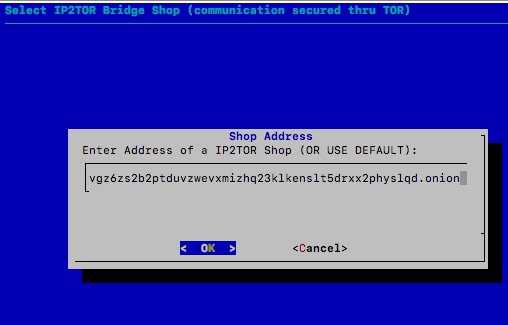
Then we get the adjacent view displayed.
An address starting with “fulmo” is already displayed.
This is the default address and we have to use it.
We confirm the preset default address with OK.
After that, we are offered various TOR Bridge. We choose one of them.
We selected the TOR Bridge in Europe at the Frankfurt site (eu-fra1).
This bridge costs 40 sats to set up and 24 sats every 24 hours thereafter.
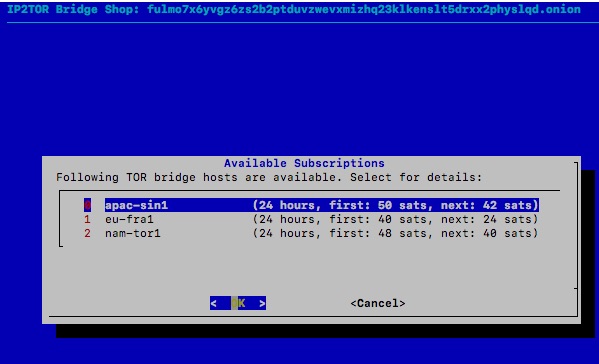
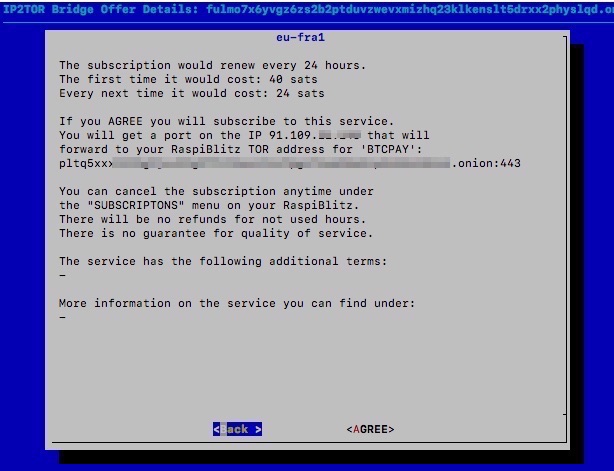
You will receive an IP address, which will be forwarded to the TOR address of the BTCPay server.
After confirming the setting by Agree.
If you receive the following message
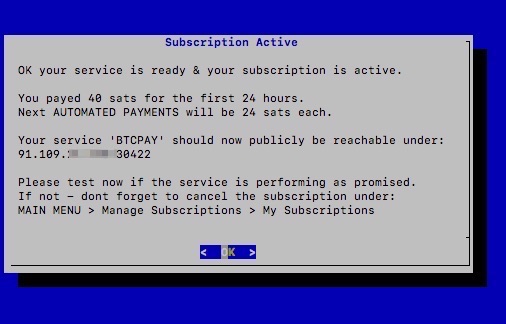
I receive an IP address and a port address (the information after the colon) from the IP2TOR service.
For example, the address is: https://89.38.225.143:41475
Lightning Direct Debit und Subskription Service
The fee for using IP2TOR service is 40 sat setup fee and 24 sats every day.
The amount is automatically deducted from the credit of the own Lightning Node on the Raspiblitz.
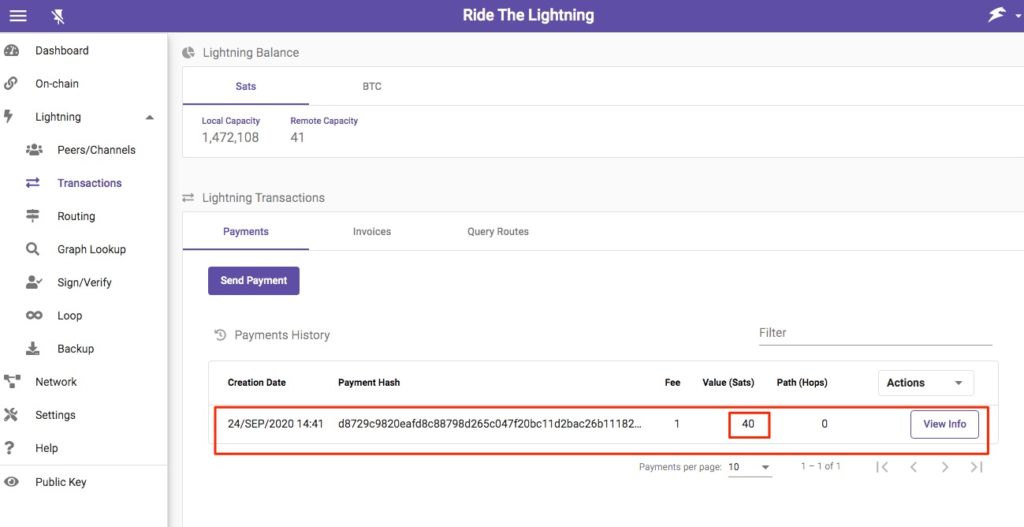
It is a daily subscription that is automatically deducted from the Lightning credit on the Raspiblitz Lightning Wallet.
The payer does not need to confirm or release anything on their Lightning Node.
Permission for daily debit was granted in the order process.
All that is required is that you already have some Public Channel and some Lightning Liquidity on your Lightning Node.
Associate IP address with a domain
We can access this IP address directly via the Internet. We can now access the BTCPay server in our home network from outside.
If this url is accessed, then the user will always be told that this access is not secure. If it is our own BTCPay server, then it is irrelevant for ourselves. But if customers want to pay with Bitcoin in our online store, this warning message better not appear.
Therefore, we will take our IP2TOR address and connect it to a domain for which we will get an appropriate certificate afterwards.
We will therefore set up a third-level domain for the IP2TOR IP address via DuckDNS for free.
DuckDNS domain
We create a third-level domain at DuckDNS.org.
With DuckDNS you don’t create your own DuckDNS account, you use the account you already have with another service.
So it is required that you already have a Twitter, Github, Reddit or Google account. For example, if you want to use your Google account, click Sign In with Google.

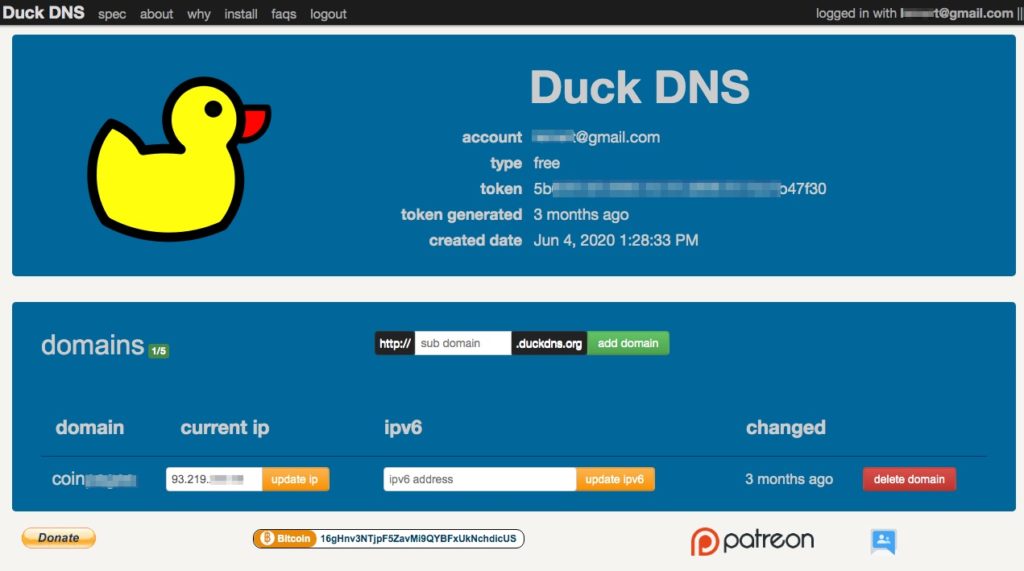
The first step is to create a third-level domain under duckdns.org. Here you enter your desired name and click on Add Domain.
After that, enter the IP2TOR address you have received in Current IP. Here only the IP address and without the port information. You can leave the ipv6 information blank.
What we will need in a moment is the details of the token. We can copy those already.
HTTPS with LetsEncrypt and DuckDNS.org
Now we still need the certificate so that visitors to our store do not receive a warning message and a closed lock is displayed in the browser window and our third-level domain can be accessed via https.
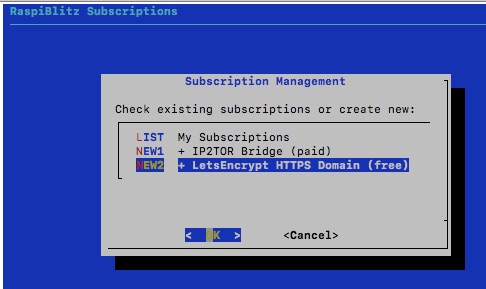
After creating a domain at DuckDNS.org, we go to the Subscription Management section of the Raspiblitz and select the LetsEncrypt HTTPS Domain service.
You get the hint that a DuckDNS account is needed.
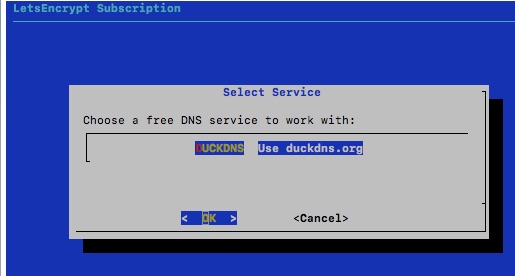
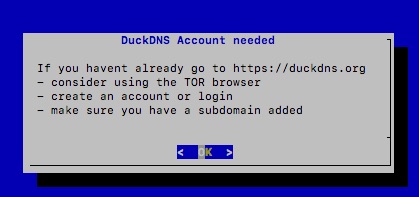
Since we have already done this in advance, we already have the relevant data.
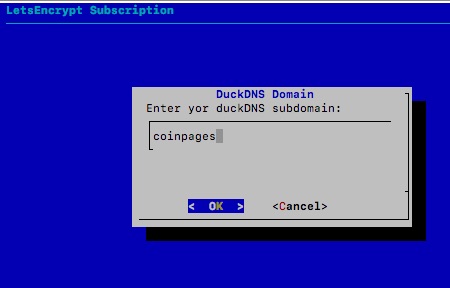
In the first step we are asked what our DuckDNS subdomain is.
We have created the domain Coinpages and enter Coinpages in the appropriate field.
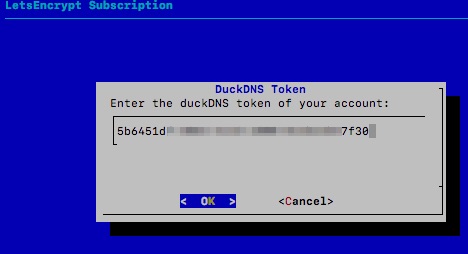
After that we are asked for the token.
Then we have to decide which service is wanted and select HTTPS for a IP2TOR Bridge.
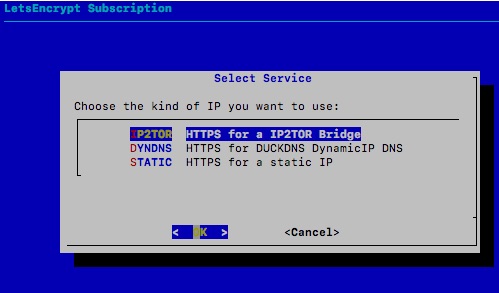
Since we already have an IP2TOR subscription set up, we get this subscription displayed as a suggestion.
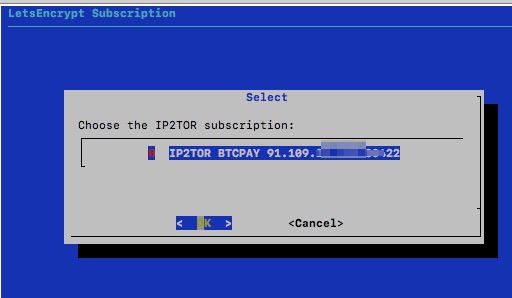
If we did not already have an IP2TOR subscription, we would now be prompted to create an appropriate IP2TOR subscription.
After that it takes a few seconds and the certificate is installed in the background.
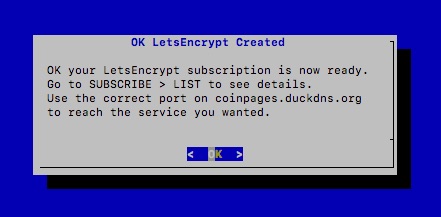
After it has been successfully set up, you can view the successfully set up IP2TOR connection and the secured HTTPS for the domain you have set up with DuckDNS under My Subscription.
Now you can access your BTCPay server directly from the Internet. Just enter the address generated by DuckDNS and add the port address.
This call can be made with any Internet browser. Calling the Internet address ensures that the IP2TOR IP address is addressed. This IP address translates the request into the TOR address of the BTCPay server running on the Raspiblitz in the home network.
If you want to access the BTCPay server in your home network from the Internet, enter the domain including the port address.
In our example: https://coinpages.duckdns.org:47731/
For example, if you are using a WooCommerce online store, then in the BTCPay for WooCommerce V2 you would specify this complete url to connect the BTCPay store with WooCommerce.

How to set up and connect a WooCommerce online store with your BTCPay server on the Raspiblitz, you can read in the post: BTCPay Server and WooCommerce.
Summary Raspiblitz BTCPay Server
The Raspiblitz is an absolute recommendation if you want to run your own BTCPay server in your home network.
You can now easily connect your own online store from the Internet to your own BTCPay server.
With your own Raspiblitz, you run your own Bitcoin Node, Lightning Node, and BTCPay server on your own hardware, saving you the monthly hosting fees with a solution like Lunanode.
The other hardware node providers such as Nodl, Mynode or Umbrel do not yet offer a solution for operating the BTCPay server securely from one’s own home network.
If you don’t have a Raspiblitzyet, you can buy one from Fulmo Shop as a complete hardware node. There you will also find instructions and further information if you want to assemble a Raspiblitz yourself.
More information about the Raspiblitz Subscription for IP2TOR and HTTPS is available on:
https://github.com/rootzoll/raspiblitz#subscribe-subscription-services
Information about Raspiblitz and the Raspiblitz Telegram Group
Github: https://github.com/rootzoll/raspiblitz
Telegram: https://t.me/raspiblitz or German-speaking Raspiblitz Telegram group: https://t.me/raspiblitz_DE





Leave a reply